
A video subtitle translator extension for watching online
Watch YouTube, X (Twitter) and ordinary Bilibili videos with translated or bilingual subtitles in their original players. WatchTranslate is a desktop Chrome extension: it translates usable caption tracks or generates subtitles from audio when a track is unavailable. Choose English or another target subtitle language and explicitly start translation.
Install from the Chrome Web Store
- Open the Chrome Web Store and click “Add to Chrome”.
- When switching from ZIP to the Store version, disable the old extension and sign in and configure the Store version again to avoid duplicate subtitles.
- Pin WatchTranslate to the toolbar, open extension settings and sign in. The website and extension require separate sign-ins.
Install ZIP manually
- Download the production extension ZIP below and extract it. Keep the extracted folder after installation.
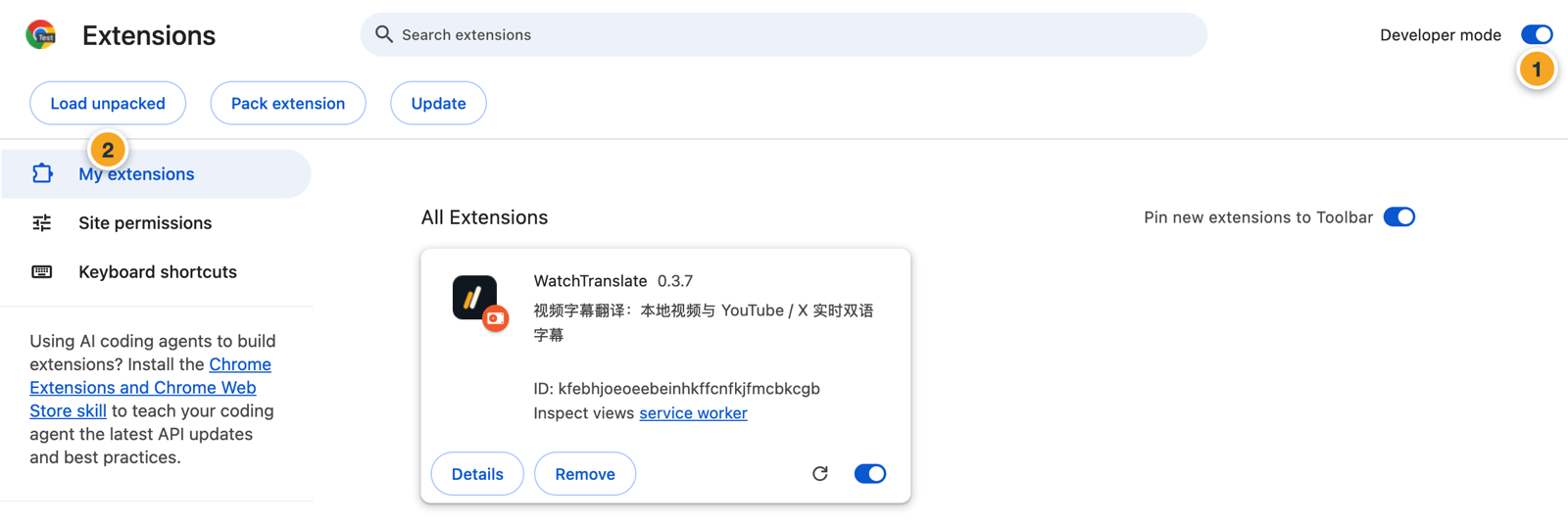
- Open chrome://extensions/ in desktop Chrome and turn on Developer mode.
- Click Load unpacked and select the extracted folder containing manifest.json, not the ZIP file.
- Pin WatchTranslate to the toolbar. Open the extension settings and sign in to WatchTranslate. A website login does not replace signing in to the extension.
Translate captions or generate subtitles from audio
- Open the video on its original website. Local files use the separate local player.
- Select the subtitle source and target language in the current video settings. Audio source language defaults to automatic detection and can be set manually.
- Click the WatchTranslate control in the player and explicitly start translation, then play the video.
- Choose original, translated or bilingual subtitles and adjust their size and position.
Existing subtitle tracks cost 0.2 credits per minute to translate; audio recognition costs 1 credit per minute, including no-speech results. Failed windows are not charged. Signup includes one-time credits; further use is paid.
Platform and device limits
YouTube and X support caption translation and audio recognition. Bilibili support is limited to ordinary videos; reading Bilibili native captions also requires signing in on Bilibili itself. Bilibili does not support full-video preparation, share links or burned MP4 export.
Pornhub and MissAV ordinary videos use audio recognition. Live streams are unsupported. This extension is for desktop browsers; use the local player for local files on a phone. Speech recognition and translation can contain errors.
FAQ
Can I translate a video without subtitles?
Yes, on supported ordinary videos the extension can recognize audio in short windows and translate the generated subtitles. It does not dub the video or work offline.
Can I translate downloaded files with the extension?
Open the local player for files on your device. The extension is for supported websites.