
How do I add subtitles to a video file?
There's no subtitle file to hunt for and no speech engine to install; the right route depends on the device the file is on. On a computer, open the WatchTranslate local player in your browser, drop the video in and press Start translation.
Five ways to subtitle a file on your own device
Our three routes next to two tools people already have; outside claims quote the vendors' pages, dated at the end.
| Devices | No subtitle file at all | What you keep | |
|---|---|---|---|
| WatchTranslate | In the browser on Windows or Mac; Android phones too[1] | Writes and translates subtitles from the speech[1] | SRT or VTT export[2] |
| WatchTranslate desktop app | Windows and Mac, for MKV, AVI and HEVC[3] | Same subtitles from the speech[3] | Same export[2] |
| WatchTranslate phone apps | Android (beta) and iPhone (iOS 17.4+)[4] | Phone videos and web videos in the built-in browser[4] | Whole film translated ahead if you like[4] |
| PotPlayer | Windows only[5] | Whisper engine generates subtitles from voice[6] | Generated subtitles can be saved next to the video; translation through separate online engines[6] |
| Windows Live Captions | Windows 11; translation on Copilot+ PCs[7] | Captions in a separate window, English or Simplified Chinese translation[7] | Nothing: captions are not stored[7] |
WatchTranslate wrote this page from its own pages and the vendors'; it is not affiliated with PotPlayer or Microsoft.
Start from the device the file is on
The quickest route is the one that needs nothing installed on the device you already have the file on. On a computer that's the browser; when the browser can't play the format, it's the desktop app; on a phone it's the app or, on Android, the phone browser. Whichever you pick, the same account and credits work everywhere.
A whole film
Open Whole-video translation and press Start whole-video translation before you sit down; subtitles are prepared in order. Stop halfway and the next run picks up where it left off without charging twice.
When the file has English subtitles
If it carries a readable text track, choose Embedded subtitles and translate it directly for 0.2 credits a minute; we measured the first line at about 2.3 seconds.
Why not the tools you already have
PotPlayer can generate subtitles on Windows once you set up its engine and a separate translator. Windows Live Captions caption any audio in their own window, translate only on Copilot+ PCs into English or Simplified Chinese, and keep nothing.
On a computer and at phone width
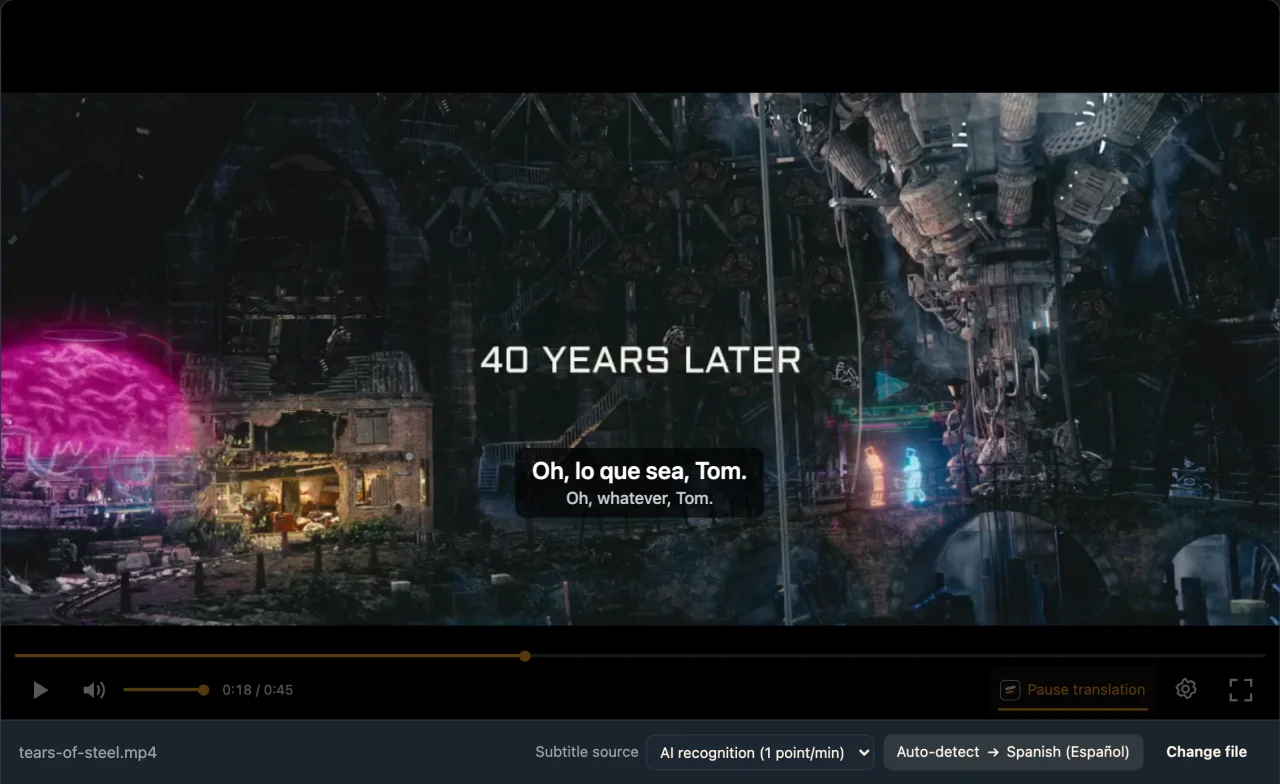
The live web local player in Chrome, signed in to WatchTranslate, with an English-dialogue open-movie clip.
- Works
Computer width · about 6 s
AI recognition, Spanish chosen for the test; first line about 6 s after Start translation.
- Works
Phone width (emulated) · about 7 s
Same film, another excerpt, in desktop Chrome emulating a 390-wide touch screen.
Tested 11 Nov 2026 · web local player · Chrome · live service
Try the browser route first; install an app only if your files need it.
About subtitling video files
What is the best way to add subtitles to a downloaded movie?
Open it in the WatchTranslate local player in your browser; switch to the desktop app if the format won't play.
Does it work on Windows and Mac?
Yes, the browser route works on both, and there are Windows and Mac apps.
Can I do it on my phone?
Yes, with the Android or iPhone app; on Android, the phone browser works too.
Is my video uploaded?
Not as a whole file; only audio pieces, or subtitle text for a track, are sent.
How is it different from PotPlayer?
No engine or separate translator to set up, and it runs on Mac and phones as well.
Can I translate a whole film first?
Yes, with Start whole-video translation.
What does it cost?
20 minutes free, then 1 credit a minute from audio, 0.2 for an existing track.
Can I keep the subtitles?
Yes, export SRT or VTT.
Sources for the table
- watchtranslate.com/guides/watch-local-video-without-subtitles ·
- watchtranslate.com/guides/export-video-with-subtitles ·
- watchtranslate.com/app/download ·
- watchtranslate.com/guides/phone-local-video-subtitles ·
- potplayer.tv/?lang=en ·
- t1.kakaocdn.net/potplayer/PotPlayer/v4/Update2/UpdateEng.html ·
- support.microsoft.com/en-us/windows/use-live-captions-to-better-understand-audio-b52da59c-14b8-4031-aeeb-f6a47e6055df ·