
Looking for a DubTab alternative?
DubTab shows live subtitles and reads the translation aloud as the audio plays, on monthly or yearly plans. If you want subtitles you can keep, a phone app, or to pay only for the minutes you use, try WatchTranslate.
Watch on your phone
Scan to get the app


WatchTranslate, DubTab and YouTube auto-translate
Only what each tool's own pages say, checked on the date shown in the sources.
| On a phone | How you pay | Keep the result | |
|---|---|---|---|
| WatchTranslate | Android and iPhone apps with a built-in browser for web videos and your own files[1, 2] | 20 free minutes, then per minute in points; a video already translated into your language is free[3] | Export subtitles as SRT or VTT, or prepare a whole video before you watch[4, 5] |
| DubTab | Chrome / Edge extension, plus desktop apps for Windows 11 and macOS 14.2 or later[6] | Monthly or yearly plans; the free plan is a one-time trial[6] | Can save the dubbed AI voice in a private History to replay; its site does not mention exporting subtitles[6] |
| YouTube auto-translate | Inside YouTube, on videos that already have captions[7] | Free[7] | Translated captions stay in YouTube's player[7] |
WatchTranslate wrote this page. We are not affiliated with DubTab or YouTube; names belong to their owners.
Who each alternative suits
We looked for tools that turn foreign-language video into something you can follow in your own language, and compared them on what people ask after trying DubTab: keeping the subtitles, watching on a phone and paying without a monthly plan.
WatchTranslate: subtitles first, on computer and phone
Use it if you would rather read than hear a second voice over the speaker. It translates a video's captions, or listens to the audio when there are none, and shows your language with the original line underneath so the speaker's own voice stays.
It works on YouTube, X, Bilibili and other video sites, on files stored on your computer or phone, and in the Android and iPhone apps, which have their own browser for web videos. Long videos can be prepared in advance, and the result exports as SRT or VTT. You pay per minute in points, and a video someone has already translated into your language costs nothing.
DubTab: when you want to hear the translation
DubTab's own pages describe live translated subtitles and natural AI voices that read the translation while the audio plays, in the Chrome and Edge extension and in desktop apps for Windows 11 and macOS. Plans are monthly or yearly and the free plan is a one-time trial. Pick it if a dubbed voice matters more to you than reading.
YouTube auto-translate: free, for the gist
If the video already has captions, YouTube can machine-translate them for free in its own player, one language at a time. It needs a caption track first, so it does nothing for videos without one.
What we tried
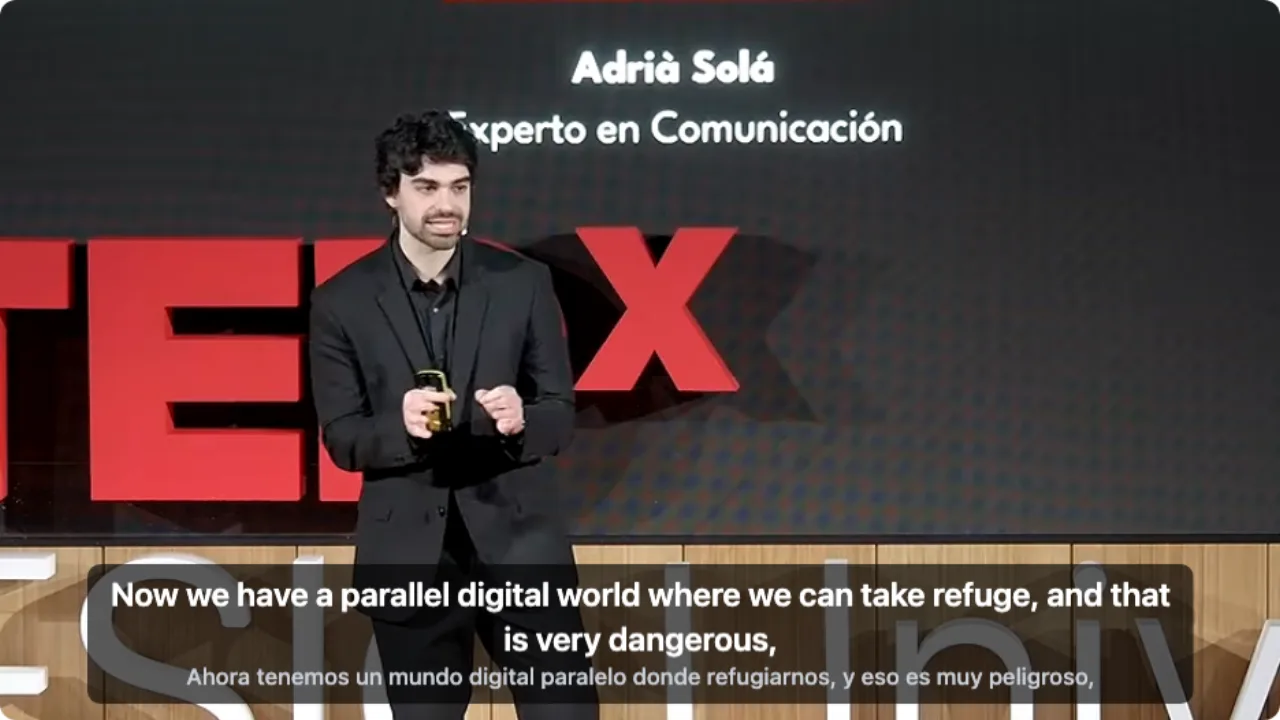
On a computer with the latest extension, signed out of YouTube, opening a Spanish talk, clicking WT on the player and choosing audio recognition.
- Works
Spanish TEDx talk · first English line in about 7 s
Audio recognition listened to the Spanish speech; English on top, Spanish below.
Tested 9 Nov 2026 · extension 0.5.737 · Chrome · signed out of YouTube
Watch on your phone
Scan to get the app
Try it on the video you were going to dub: click WT on a computer, or tap Translate in the app.
About DubTab alternatives
How much does this DubTab alternative cost?
Signing up gives 20 free points, about 20 minutes, with no card needed. After that you pay per minute in points for what you watch.
Does WatchTranslate dub videos with an AI voice?
No. It shows translated subtitles and keeps the speaker's own voice. You can show the translation, the original or both.
Can I use it on my phone?
Yes. The Android and iPhone apps have a built-in browser for web videos and can translate videos stored on the phone.
What if the video has no captions?
WatchTranslate listens to the audio and creates subtitles as you watch. With captions, it translates them instead.
Can I keep the translated subtitles?
Yes. Export them as SRT or VTT. For long videos you can also prepare the whole video in advance.
Which sites does it work on?
YouTube, X, Bilibili and many other video sites, plus your own files. The supported-sites page has the full list.
Is the translation accurate?
It depends on the audio. Background music or several people talking at once make recognition harder. Try a short clip first, then decide.
Can I use both?
Yes. They are separate extensions; you can keep DubTab for dubbing and use WatchTranslate when you want subtitles.
Sources (checked on the date shown)