
Dualsub vs WatchTranslate: which one for dual subtitles?
Dualsub shows two subtitle lines on YouTube, and from version 2.72.0 it supports YouTube only. If you also watch X, Bilibili or your own files, or videos with no captions at all, use WatchTranslate: it listens to the audio and shows both lines as you watch.
Watch on your phone
Scan to get the app


Dualsub, WatchTranslate and YouTube's own captions
Only what each tool's own pages say, checked on the date shown in the sources.
| Which sites | Your own video files | Where it runs | |
|---|---|---|---|
| WatchTranslate | YouTube, X, Bilibili and other video sites[1] | Plays and translates local files; the file is not uploaded[2] | Chrome / Edge extension, plus Android and iPhone apps with a built-in browser for web videos[3, 4] |
| Dualsub | YouTube only from version 2.72.0 (8 Nov 2026), which dropped five other sites[5, 6] | Its supported-sites page lists YouTube pages only[5] | Browser extension for Chrome, Edge and Firefox[7] |
| YouTube auto-translate | YouTube only[8] | Videos uploaded to YouTube only[8] | YouTube's own player, on videos that already have captions[8] |
WatchTranslate wrote this page. We are not affiliated with Dualsub or YouTube; names belong to their owners.
Pick by what you watch
Both Dualsub and WatchTranslate put the original line and your language on screen together, which is what most people searching for Dualsub want. The difference is where that works and what happens when a video has no captions to start from.
WatchTranslate: dual subtitles wherever the video is
Use it if you watch beyond YouTube: X posts, Bilibili, other video sites, or files on your computer and phone. When a video has no captions, it listens to the people speaking and writes the original line and the translation as you watch, so you are not stuck with a greyed-out CC button.
You can show the original, the translation or both, and export the result as SRT or VTT to keep. On a phone, the Android and iPhone apps open web videos in their own browser and translate files stored on the phone. You get 20 free minutes at sign-up, then pay per minute in points; a video someone already translated into the same language costs nothing.
Dualsub: YouTube with two caption lines
Dualsub is a browser extension for Chrome, Edge and Firefox that translates and shows dual subtitles on YouTube. Since version 2.72.0 it lists only www.youtube.com and m.youtube.com; older site support needs an earlier offline build, according to its own site. If YouTube is all you watch and the videos already have captions, it does that one job.
YouTube's own auto-translate: the gist, one language at a time
YouTube can machine-translate a caption track the video already has. It shows one language at a time and needs captions first, uploaded by the creator or generated by YouTube. It is free and worth trying before installing anything.
What we tried
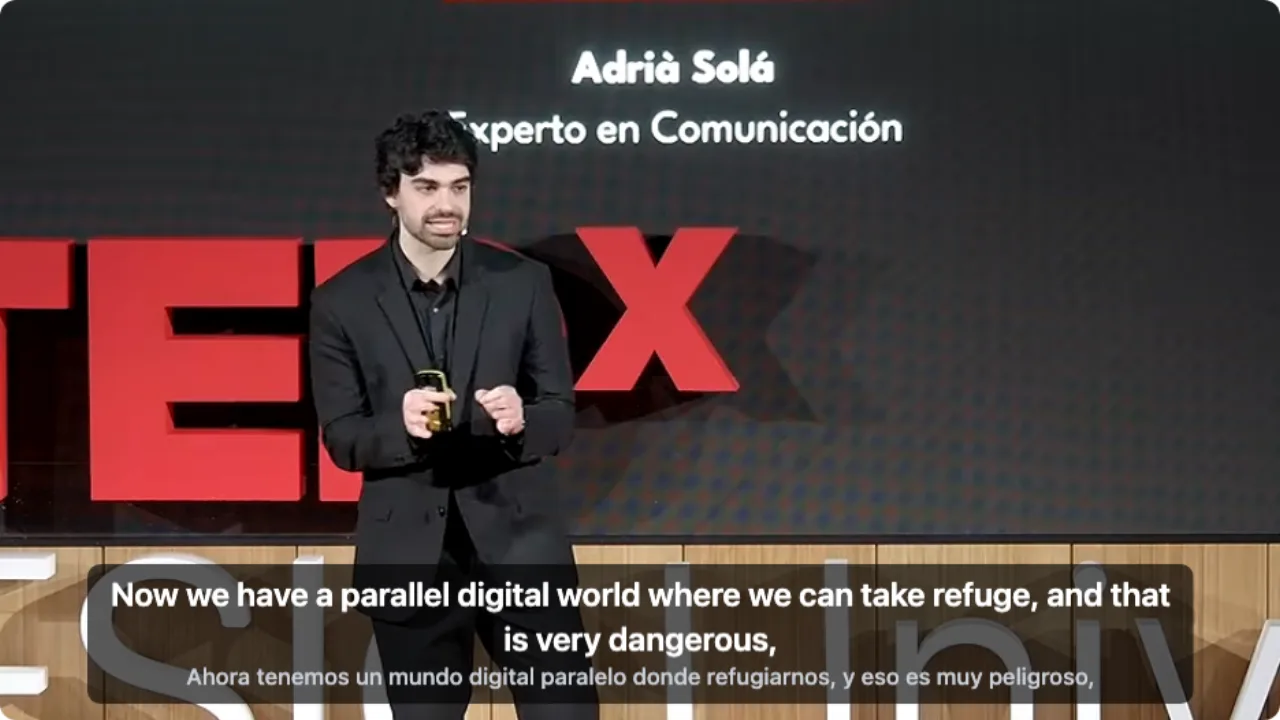
On a computer with the latest extension, signed out of YouTube, opening a Spanish talk, clicking WT on the player and choosing audio recognition.
- Works
Spanish TEDx talk · first English line in about 7 s
Audio recognition listened to the Spanish speech; English on top, Spanish below.
Tested 9 Nov 2026 · extension 0.5.737 · Chrome · signed out of YouTube
Watch on your phone
Scan to get the app
Already have Dualsub? You can keep it for YouTube and add WatchTranslate for everything else.
About Dualsub and WatchTranslate
Is WatchTranslate a Dualsub alternative?
Yes. Both show the original line and the translation together. WatchTranslate also works on X, Bilibili, other video sites and local files, and it creates subtitles from the audio when a video has none.
Why did Dualsub stop working on some sites?
Dualsub's own changelog says version 2.72.0, released on 8 November 2026, dropped iflix, iQ.com, Viki, Youku and WeTV, and its site list now names YouTube only.
Can WatchTranslate translate a YouTube video with no captions?
Yes. Click WT on the player and choose audio recognition; it listens to the speech and shows subtitles in your language a few seconds after playback starts.
Can I see two languages at once?
Yes. Choose the original, the translation or both.
Does it work on my phone?
Yes. The Android and iPhone apps have a built-in browser for web videos and can translate videos stored on the phone.
Can I keep the subtitles?
Yes. Export them as SRT or VTT and use them in any player.
How much does it cost?
Signing up gives 20 free points, about 20 minutes. After that you pay per minute in points. If someone already translated the same video into the same language, watching it is free.
Can I keep using Dualsub too?
Yes. The two are separate extensions. Many people keep one for YouTube and use WatchTranslate where the other does not reach.
Keep reading
Choosing a tool
Dual subtitles
- Bilingual subtitlesThe original and your language together
- YouTube video has no subtitles
- Export subtitles
More: All guides · Supported sites
Sources (checked on the date shown)
- watchtranslate.com/supported-sites ·
- watchtranslate.com/guides/watch-local-video-without-subtitles ·
- watchtranslate.com/guides/video-translator-extension ·
- watchtranslate.com/app/download ·
- www.dualsub.xyz/en/docs/website.html ·
- www.dualsub.xyz/en/docs/changelog.html ·
- www.dualsub.xyz/ ·
- support.google.com/youtube/answer/6373554?hl=en ·