
What are bilingual subtitles, and why use them?
Bilingual subtitles keep the original line and add its translation, so both sit on screen at once. WatchTranslate puts them on YouTube, X, Bilibili and your own files: your language on top, the original right below.
Watch on your phone
Scan to get the app


Turn on bilingual subtitles in three steps
Add the extension
Chrome or Edge on a computer. Files on your computer use the web player instead.
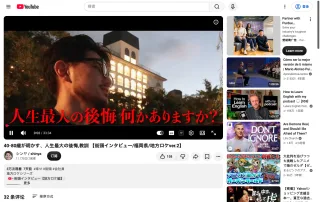
Start translation
Click WT on the player, set Target language to your language and press Start translation.

Pick a bilingual display
In the Appearance tab choose Bilingual with your language on top, or with the original on top.
What the second line is for
Check a line without pausing
When a translation reads oddly, the original is right underneath; you can tell at a glance whether the meaning came through.
Names and terms stay visible
Brands, places and jargon a translation might smooth over are still there in the original.
Reading practice with context
Learning the video's language? The meaning sits next to the phrasing, line by line.
Where two lines help most
Language study
Spanish, Japanese or Korean videos with the original kept on screen.
Anime and dramas
Catch the honorifics, names and wordplay a single line loses.
Lectures with jargon
Technical terms in the original next to their translation.
News and interviews
Check exactly what was said before you quote it.
Music videos and lyrics
The original lyric and its meaning, line by line.
Watching with family
One person reads the original, another the translation, same screen.
Can't the video site show two languages?
Most players show one subtitle track at a time. That is enough when you only need one language.
| What you want | Typical site player | With WatchTranslate |
|---|---|---|
| Only your language | Pick that track if it exists | Translation-only display |
| Original and translation together | One track at a time | Two lines, either order |
| Two lines on a video with no subtitles | Nothing to show | Original written from the audio, then translated |
| A bilingual subtitle file | Not offered | Export bilingual SRT or VTT |
Site players differ; the table describes YouTube, X and Bilibili in a computer browser.
What we tried
On a computer with the live extension, signed out of YouTube, on a video with no caption track.
- Works
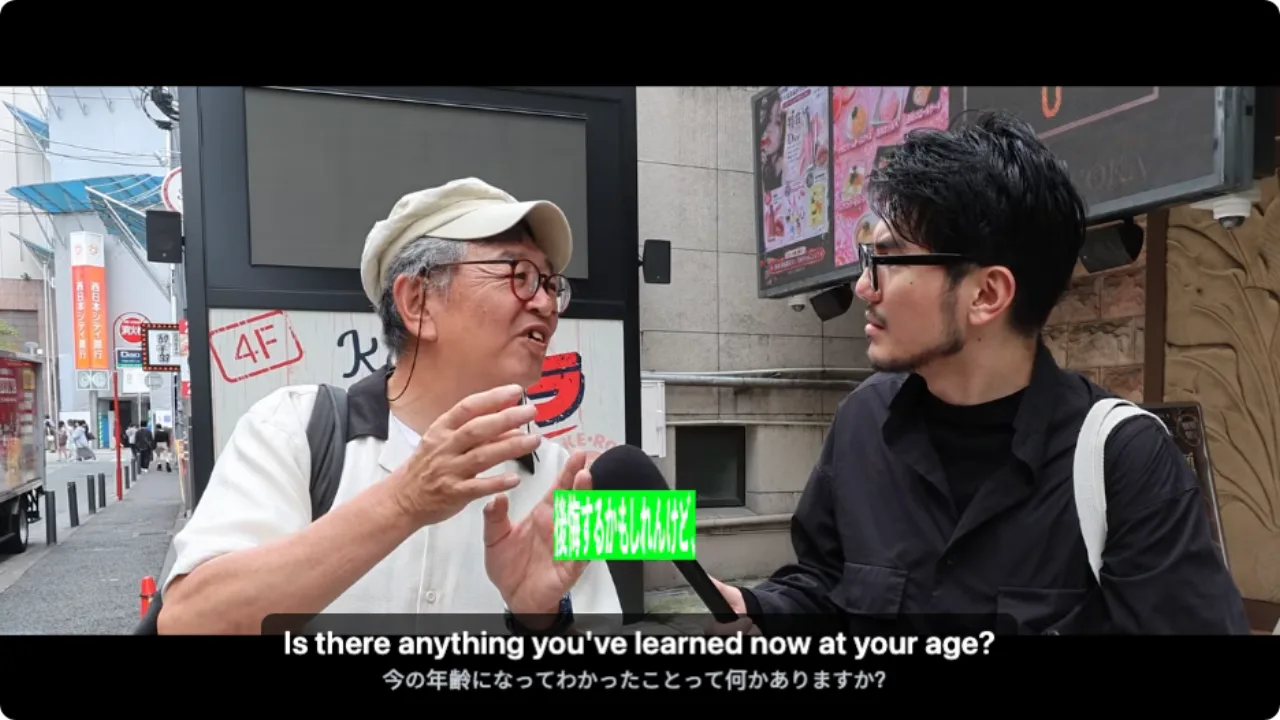
Japanese street interview · two lines in about 10 s
Japanese written from the audio, English on top of it, both on YouTube's player.
Tested 8 Nov 2026 · extension 0.5.732 · Chrome · signed out of YouTube
Watch on your phone
Scan to get the app
Then open a video, press Start and pick a bilingual display.
In detail
Which of the four displays to use
| Display | Best for | Worth knowing |
|---|---|---|
| Bilingual · translation on top | Following the story, checking now and then | The default; your language is read first |
| Bilingual · original on top | Language learners | Read the original first, glance down when stuck |
| Target only | Relaxed viewing | One line, the least screen space |
| Original | Listening practice | Exactly what is said, in its own language |
What makes subtitles bilingual
Ordinary translated subtitles replace the original text. Bilingual subtitles keep it: each line of the original stays on screen with its translation stacked above or below, on the same timing. For most viewing one translated line is enough; the second line earns its space when you need to check a translation, keep a name exactly as said, or learn the language you are hearing.
Changing the display costs nothing
The original and the translation are both kept once a stretch is processed, so switching between the four displays happens instantly and doesn't start anything again.
Size and position
Two lines take more room. In the Appearance tab, make the text smaller or move the block up; the original line is shown smaller than the translation by default.
On your own files and on a phone
The web player shows the same displays for videos on your computer. On a phone, the WatchTranslate app shows bilingual subtitles too.
How the two lines are made
Where does the original line come from?
From the video's own subtitle track when there is one, or from speech recognition when there isn't. Either way it is the line the translation is made from.
Why do the lines match up?
Each translated line is produced from one original line and shares its timing, so the pair always appears and disappears together.
Is the translation done line by line?
No. A large language model translates with the surrounding sentences in view, which keeps names and references consistent across lines.
What YouTube's player offers
From the YouTube Help Center, checked signed out of YouTube on .
YouTube's captions are switched on and styled from the CC button and the settings menu, one caption track at a time.
support.google.com/youtube/answer/100078
Get the most from two lines
Learners: original on top
Your eyes land on the language you are studying first.
Shrink the text a notch
Two smaller lines cover less of the picture than two large ones.
Switch freely
Drop to translation only for an action scene, back to bilingual for dialogue.
Export both lines
A bilingual SRT is a handy study sheet with timestamps.
About bilingual subtitles
Can I turn the original line off?
Yes. Choose Target only in the Appearance tab, and switch back to bilingual any time.
Are bilingual subtitles good for learning a language?
Yes. You see the meaning and the original phrasing together, so you follow the story while picking up the language.
Does it cost more than one line?
No. The cost is the same whichever display you choose.
Do they work on files on my computer?
Yes. The web player supports the same bilingual displays.
Do they work when the video has no subtitles?
Yes. The original line is written from the audio first, then translated.
Can I put the original on top?
Yes. Choose Bilingual with the original on top.
Can I download bilingual subtitles?
Yes. Export SRT or VTT and choose bilingual.
Which languages can be paired?
Any spoken language the video uses with any of the 74 subtitle languages.
Do they work on a phone?
Yes, in the WatchTranslate app.
One tool to understand foreign-language videos on many sites
Translates as you watch, wherever you are in the video
Jump anywhere and it translates there — no need to translate the whole video first.
Translate videos on YouTube, X, Bilibili and more
Translate existing subtitles directly, or generate bilingual subtitles when there are none.
Better translation quality than traditional machine or real-time translation
AI language models use context and connect the surrounding dialogue to understand meaning.
Export subtitles as SRT / VTT files
Download generated subtitles as original, translated, or bilingual text and load them in common players.
Already translated by someone? Watch it free
Sign up free to reuse generated subtitles for the same video, subtitle source and languages, even after your credits run out.
Bilingual subtitles on your phone
Play video files on your phone, or open a video site in the app's built-in browser and tap Translate. A native player handles more video formats than the web player.
Keep reading
Related questions
- Subtitles in the original languageOnly the spoken words
- Translate a video while watchingTwo lines as it plays
- Export SRT or VTTSave a bilingual file
Choosing a tool
More: All guides · Supported sites
Also in: 简体中文