
Bilibili.tv English subtitles, on any video Not only the shows with an official track
Licensed shows on Bilibili.tv come with official subtitles; creator uploads only have what the uploader added. WatchTranslate listens and writes English onto the player as it plays.
Watch on your phone
Scan to get the app


Official subtitles stop where the licences stop
Bilibili.tv translates the series it licenses. Anything a creator uploads gets the subtitles that creator made, in the languages they picked, and often none at all.
- A subtitle track only if the uploader made one
- Languages chosen by the uploader, not by you
- No translate option in the player

- English from what is actually said, sentence by sentence
- The original line underneath, or English only if you prefer
- No Bilibili.tv account needed
English on Bilibili.tv in three steps
Install the extension
Add WatchTranslate to Chrome or Edge on a computer. About thirty seconds.

Play the video on Bilibili.tv
Any upload or episode you can already watch. Signed out is fine; dismiss the sign-in card if it appears.
 WTHello everyone, I'm Donghui
Click the WatchTranslate icon
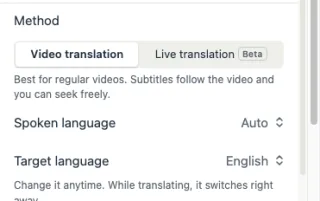
In the toolbar, choose Translate this video. Target language: English. The first line arrives in about half a minute.
Built for the uploads Bilibili.tv leaves untranslated
Hears the soundtrack
Mandarin, Korean, Thai or Japanese speech is transcribed, then turned into English lines. No subtitle track required.
English above, original below
Bilingual by default, which helps with names, slang and the jokes in variety clips. Switch the original off in the Appearance tab.
Episodes with official subtitles
On a licensed episode, WatchTranslate can start from the official subtitles and translate them, so the lines match the show's own timing.
Your language, not the uploader's
Need Arabic, Spanish or Russian instead? Pick another target language; the same video works the same way.
Keep the subtitles
The Export tab saves SRT or VTT, handy for vocabulary lists from a vlog or a lesson.
Stays on the Bilibili.tv player
Lines appear over the video you are watching. Nothing to download, nothing to upload.
What English speakers open on Bilibili.tv
Korean variety and reality shows
Game shows and travel clips where the fun is in what people say, fast.
Donghua and anime
Chinese animated series, with the official track translated when one exists.
Thai dramas and short series
Romance, BL and web series uploaded episode by episode.
K-pop group content
Behind-the-scenes clips and group shows from fan uploads and official channels.
Creator vlogs
Students, travellers and cooks talking straight to the camera in their own language.
Drawing and craft tutorials
Step-by-step lessons where the explanation matters as much as the picture.
Are Bilibili.tv's own subtitles enough?
For licensed series, often yes. Here is how the common cases look when you want English.
| The video you're watching | What the Bilibili.tv player offers | With WatchTranslate |
|---|---|---|
| Licensed anime or drama episode | Official subtitles in the languages Bilibili.tv chose for that title | English from the official track or the audio, with the original line kept |
| Creator upload with a subtitle track | The uploader's track, in the uploader's languages | English from the audio, whatever the uploader picked |
| Creator upload with no track | The soundtrack only | English lines built from the speech as the video plays |
The Bilibili.tv column reflects the bilibili.tv web player's subtitle menu on November 12, 2026, signed out. Check Bilibili.tv's current page.
What we tried on Bilibili.tv
On a computer with the current extension, signed out of Bilibili.tv: open the video, click the WatchTranslate icon, start.
- Works
A Korean student's vlog in Mandarin · English subtitles
Audio recognition gave English lines from the speech; the first one appeared 27 seconds after the click.
- Works
The same vlog · Arabic subtitles
We switched the target language to Arabic and ran it again; the lines followed the same sentences.
Tested November 12, 2026 · extension 0.5.793 · Chrome · signed out of Bilibili.tv
Watch on your phone
Scan to get the app
Try your 20 free minutes on the Bilibili.tv upload you have been watching with no subtitles.
In detail
What to do for each kind of Bilibili.tv video
| The Bilibili.tv video | What to do | Worth knowing |
|---|---|---|
| Creator vlog or variety clip without English | Target language: English; leave Subtitle source on Auto | The first line takes about half a minute |
| Licensed episode with official subtitles in other languages | Target language: English; the official track is used when it fits | Lines keep the episode's own timing |
| You want a language the menu does not list | Pick it as Target language | The same video gives the same sentences in that language |
How WatchTranslate makes the subtitles
Where do English lines come from on an upload with no subtitles?
WatchTranslate takes the playing video in short stretches, recognises the speech in each one and translates it. The current stretch and the next are prepared first, so lines keep pace with playback.
What happens on an episode with official subtitles?
On licensed Bilibili.tv episodes WatchTranslate can read the official subtitle track and translate those lines, which keeps the show's own wording and timing.
Why do some videos show subtitles almost at once?
Results are kept per video and target language. If someone already translated the same Bilibili.tv video into English, those lines are reused.
Get the most out of it
Start near the talking
Begin where people speak, not on a long music intro; lines arrive sooner.
Keep the original for names
Variety shows are full of nicknames; the original line underneath makes them easy to follow.
Export after a tutorial
Save the SRT when a lesson ends, so the steps are there to reread.
Bilibili.tv subtitle questions
How do I get English subtitles on Bilibili.tv?
If the episode has an official English track, pick it in the player's subtitle menu. For anything else, install WatchTranslate in Chrome or Edge, play the video on bilibili.tv, click the WatchTranslate icon, choose English and start.
Why does this Bilibili.tv video have no English subtitles?
Official subtitles come with the series Bilibili.tv licenses. Videos uploaded by creators carry only the subtitles the uploader added, which may be none.
Does it work on Bstation?
Yes. Bstation is the name Bilibili uses for bilibili.tv in Southeast Asia; it is the same site and player.
Do I need a Bilibili.tv account?
No. We tested signed out. A free WatchTranslate account holds your free minutes.
Which languages can the video be in?
Spoken Mandarin, Korean, Thai, Japanese, Indonesian, English and more. WatchTranslate detects the language on its own.
Can I get subtitles in a language Bilibili.tv does not offer?
Yes. Choose any target language, for example Arabic, Turkish or Russian, and the lines come in that language.
How is this different from bilibili.com?
bilibili.tv is Bilibili's international site with its own catalogue. WatchTranslate works on both; for bilibili.com see the Bilibili video translator page.
Can I keep the Chinese or Korean line too?
Yes, that is the default: English on top, the original underneath. Turn the original off in the Appearance tab for English only.
How long until the first line shows?
In our test the first English line appeared about 27 seconds after clicking start; after that, lines follow the video.
How much is free?
New accounts get 20 free minutes, no card needed.
Is WatchTranslate part of Bilibili.tv?
No. It is an independent extension that shows subtitles over the Bilibili.tv player without changing the video.
Keep reading
Bilibili
By content
- English subtitles for Chinese videosVlogs, talks, variety
- English subtitles for Japanese videos
- Bilingual subtitlesTwo languages at once
More: Supported sites · All guides
Also in: 日本語 · 한국어 · Español · Deutsch · Français · Português · Italiano · العربية · Polski · Nederlands · Türkçe · ไทย · Bahasa Indonesia · Tiếng Việt · Русский · हिन्दी
Bilibili, Bstation and their logos belong to their owner. WatchTranslate is not affiliated with Bilibili.