
How do I translate Bilibili videos to English subtitles?
Bilibili's player has no translation for speech, and many uploads have no subtitles at all. Add WatchTranslate, click WT on the Bilibili player and set Target language to English: it uses the video's subtitles when it can read them and listens to the Chinese audio when it can't.
Watch on your phone
Scan to get the app

Three steps to English on a Bilibili video
Add the extension and sign in
Add WatchTranslate to Chrome or Edge on a computer and sign in to it. A Bilibili account is optional.
Open the video on bilibili.com
A regular video, a part of a series, a playlist or event page, or an anime or film episode you can play.
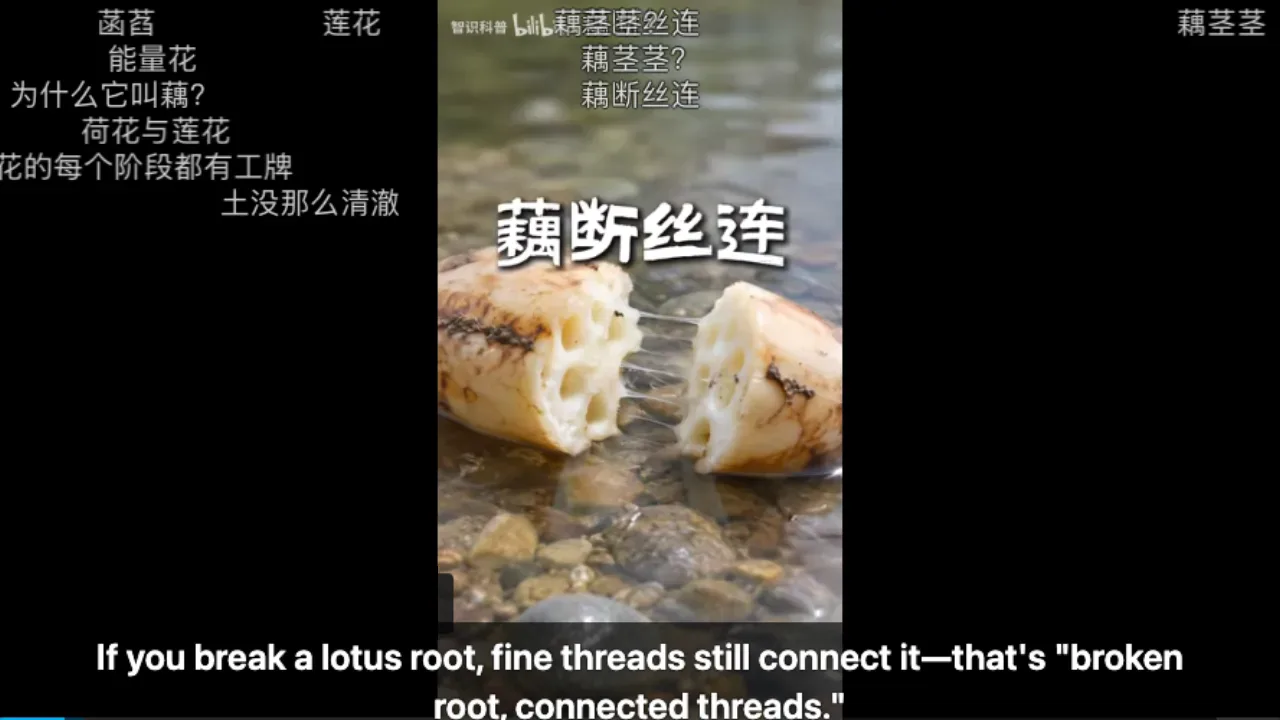
 WTIf you break a lotus root, fine threads still connect it.
Click WT, choose English, start
WT sits on the right of Bilibili's control bar, near full screen. Set Target language to English and press Start translation.
What Bilibili looks like with it
Narration without subtitles, in English
Science shorts, vlogs and game commentary often carry Chinese text only as on-screen titles. The Mandarin speech itself becomes your English line.
Parts and series, one at a time
Each part of a multi-part upload is its own video. Switch parts, press Start again and the subtitles follow the new part.
Whole episodes ready in advance
For a two-hour recording or documentary, prepare the full video first and watch while it works.
What English speakers watch on Bilibili
Science and history explainers
Short, dense Chinese explainers where the narration carries all the meaning.
Game commentary and esports
Let's plays and match casting from Chinese creators, hours long.
Daily-life vlogs from China
Cities, food and work life, filmed and narrated in Mandarin.
Tech reviews and teardowns
Phones and gadgets reviewed before they reach other markets.
Chinese learning material
Read the English with the Chinese line right below it.
Documentaries and lectures
Long talks and documentaries reposted as multi-part uploads.
Can Bilibili translate videos itself?
Bilibili shows subtitles that an uploader added, in the uploader's language, and only to signed-in viewers. Everything else is where WatchTranslate comes in.
| The video | On bilibili.com | With WatchTranslate |
|---|---|---|
| Uploader added Chinese subtitles | Shown after you sign in to Bilibili | Translated to English once you're signed in |
| Narration only, no subtitles | Nothing to show | Listens to the Mandarin and writes English |
| Chinese text burned into the picture | Part of the video, not a track | Speech becomes English; burned-in titles stay as they are |
| A two-hour recording | Same as above | Can be prepared in full before you watch |
What the table shows is bilibili.com in a computer browser.
What we tried on Bilibili
On a computer with the live extension, signed out of Bilibili, clicking WT on the player.
- Works
Chinese science short · first English line in about 4 s
Audio recognition turned the Mandarin narration about lotus roots into English, sentence by sentence.
Tested 9 Nov 2026 · extension 0.5.737 · Chrome · signed out of Bilibili
Watch on your phone
Scan to get the app
Then go back to the Bilibili video and click WT on the control bar.
In detail
Which subtitle source for which video
| The video | Subtitle source | Worth knowing |
|---|---|---|
| Uploader added a subtitle track | Video subtitles (sign in to Bilibili first) | Faster and cheaper: 0.2 credits a minute, timing follows the uploader's track |
| Narration only | Audio recognition | 1 credit a minute; works while signed out of Bilibili |
| Video subtitles is greyed out | Audio recognition | The panel found no readable track for this video |
| Track unavailable after you chose it | Sign in to Bilibili again, or switch to audio | A read failure does not mean the video has no subtitles |
Why Bilibili videos rarely come with English
Bilibili is built for Chinese-speaking viewers. Subtitle tracks exist only where an uploader added one, usually in Chinese, and Bilibili shows them to signed-in viewers. Many videos have no track at all: the Chinese you see on screen is part of the picture, and the meaning is in the narration. The bullet comments drifting across the frame are viewers' remarks, not subtitles. WatchTranslate works on the narration or on the track, whichever it can read.
The panel picks a source for you
When you open WT, the panel first checks whether this video has a subtitle track it can read; you may see Checking source for a second. If there is one, it is used. If there is definitely none, Video subtitles is greyed out and audio recognition is chosen.
Signing in to Bilibili
Only reading an uploader's subtitle track needs a Bilibili sign-in in the same browser. Audio recognition listens to the video and works signed out, which is how we tested.
Display, parts and saving
In the Appearance tab choose bilingual with English on top, bilingual with the original on top, Target only or Original, and adjust size and position. Each part of a series is a separate video, so press Start again after switching. The Export tab saves what has been generated as SRT or WebVTT.
How WatchTranslate turns Mandarin into English
Where does the English come from?
The part you are watching is taken about 30 seconds at a time. Speech is recognised into Chinese, then a large language model translates it into English with the sentences around it in view, so terms and names stay consistent.
Why does it keep up after I skip?
The current stretch and the next one are processed first. When you jump ahead, work starts from the stretch you landed in instead of from the beginning.
What does preparing in advance do?
Check video shows the estimated cost, then the whole video is processed while you watch. You can pause and resume; finished parts are not charged twice, and Retry unfinished fills any gaps.
Get the most out of Bilibili
Start with narrated videos
Explainers and vlogs where one person speaks clearly give the fastest, cleanest English.
Sign in when there is a track
If the uploader added subtitles, signing in to Bilibili lets WatchTranslate translate them directly.
Keep the Chinese line for learning
Bilingual display puts English and the original together, useful when you study Chinese.
Prepare long uploads first
Two-hour recordings and documentaries play smoothly once the whole video is ready.
About English subtitles on Bilibili
I installed it but there is no WT on the Bilibili player.
Reload the video page and look at the right of the control bar, next to full screen. If it is still missing, check at chrome://extensions/ that WatchTranslate is on and signed in.
Do I need a Bilibili account?
Only to read a video's own subtitle track, which Bilibili shows to signed-in viewers. Audio recognition works signed out.
Why is Video subtitles greyed out?
The panel found no readable track for this video. Choose audio recognition. If you are sure the video has subtitles, sign in to Bilibili and reload.
How long until the first line?
On our 9 November test the first English line appeared about 4 seconds after Start; then lines follow playback.
Two sets of subtitles are on screen.
Bilibili's own subtitles are on too. Turn them off from Bilibili's subtitle menu and keep the WatchTranslate line.
What happens when I switch to another part?
Each part is a separate video. Open the panel, check the source and language, and press Start again.
Does it work on anime and film episodes?
Yes, on the episodes your Bilibili account can play. Courses and special players are not covered.
What does it cost?
New accounts get 20 free minutes. Translating a track is 0.2 credits a minute and audio recognition 1; failed windows are free.
Can I use it on my phone?
On Android, install the WatchTranslate app, open the Bilibili video in it and tap Translate.
Is WatchTranslate made by Bilibili?
No. It is an independent extension that shows subtitles on Bilibili's player without changing the video.
One tool to understand foreign-language videos on many sites
Translates as you watch, wherever you are in the video
Jump anywhere and it translates there — no need to translate the whole video first.
Translate videos on YouTube, X, Bilibili and more
Translate existing subtitles directly, or generate bilingual subtitles when there are none.
Better translation quality than traditional machine or real-time translation
AI language models use context and connect the surrounding dialogue to understand meaning.
Export subtitles as SRT / VTT files
Download generated subtitles as original, translated, or bilingual text and load them in common players.
Already translated by someone? Watch it free
Sign up free to reuse generated subtitles for the same video, subtitle source and languages, even after your credits run out.
Bilingual subtitles on your phone
Play video files on your phone, or open a video site in the app's built-in browser and tap Translate. A native player handles more video formats than the web player.
Keep reading
Related questions
- Web video with no subtitle trackThe same question on other sites
- YouTube video has no subtitlesSubtitles from the audio
- Prepare a whole video in advanceFor long uploads
- Bilibili vs Bilibili.tv: English on eachWhich site, which subtitles
- Bilibili subtitles not showing: whyNo CC button, 登录可享, burned-in text
- Export Bilibili subtitles to SRTOriginal, target or bilingual file
Sites
- Bilibili video translatorChinese videos in English
- Chinese videos with English subtitlesBilibili, RedNote, YouTube
Choosing a tool
More: All guides · Supported sites
Also in: 简体中文 · 繁體中文 · 日本語 · 한국어 · Español · Deutsch · Français · Português · Italiano · العربية · Polski · Nederlands · Türkçe · ไทย · Bahasa Indonesia · Tiếng Việt · Русский · हिन्दी