
Bilibili subtitles not showing? Why, and how to get them
Usually there is nothing to switch on: many Bilibili uploads have no subtitle track, any uploader or AI track stays hidden until you sign in to Bilibili, and the Chinese text on the picture is often part of the video itself. Either way, WatchTranslate makes subtitles from the speech: click WT on the player, keep Subtitle source on Audio recognition, and start.
Watch on your phone
Scan to get the app

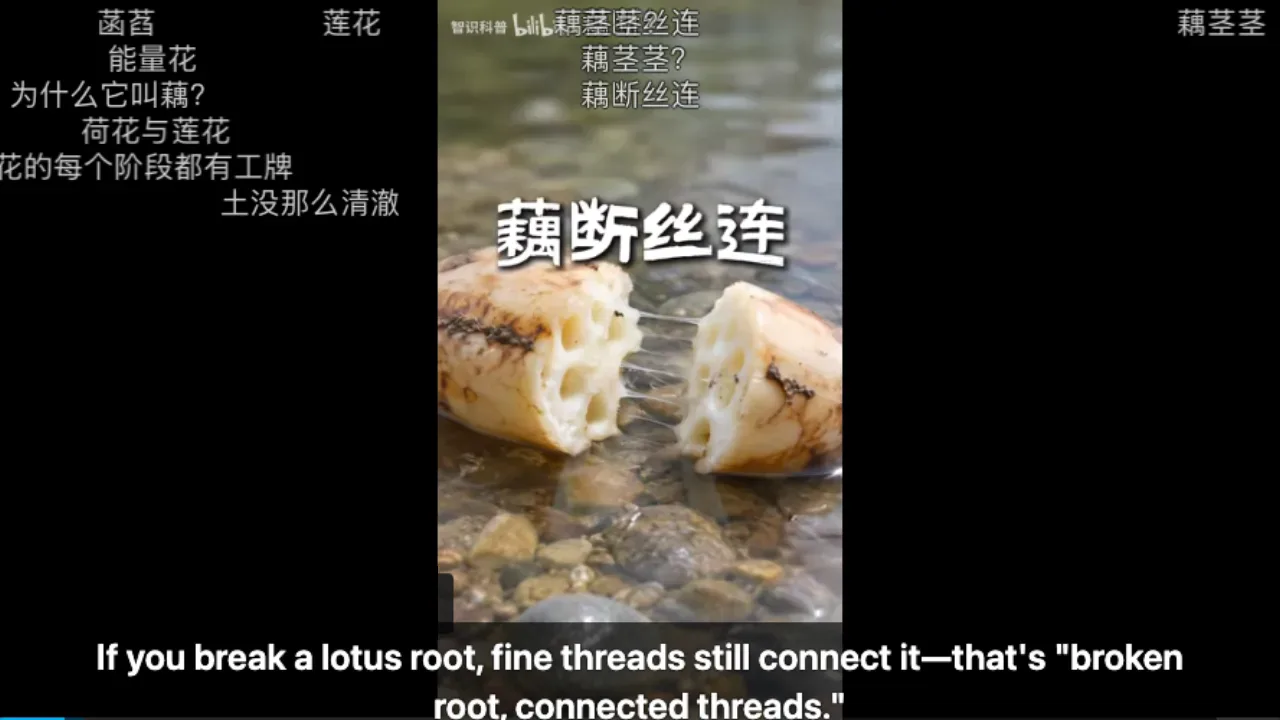
Subtitles for a Bilibili video that has none
Add WatchTranslate
Chrome or Edge on a computer. A free WatchTranslate account holds your 20 free minutes.
Open the video with no subtitles
Any bilibili.com upload, one part of a multi-part video, or an episode you can already play. Signing in to Bilibili is not needed.
 WTIf you break a lotus root, fine threads still connect it.
Click WT and start
WT sits on the player's control bar. Pick your Target language; Subtitle source switches to Audio recognition by itself when the video has no track.
What changes once WatchTranslate is on
Subtitles without a track
Audio recognition listens to the Mandarin and writes each sentence in your language, so a video with no track still gets subtitles.
Uploader tracks in your language
When an uploader did add a track, sign in to Bilibili and choose Video subtitles: those lines are translated with their own timing.
Readable over burned-in text
Your line sits at the bottom of the player, with the original sentence under it if you like, and you can move it or make it larger.
Six reasons a Bilibili video shows no subtitles
There is no CC option at all
The uploader never added a track. Many narrated explainers, vlogs and game videos are like this.
Menu says 登录可享
It means "sign in to use": signed out, Bilibili hides any uploader or AI track, so you cannot tell whether one exists.
Chinese text that will not turn off
Captions drawn into the picture by the uploader. They are part of the video, not a track the player can hide.
Moving text across the picture
That is danmaku, viewers' bullet comments. The 弹 switch under the player hides them; they are not subtitles.
Only Chinese subtitles
Uploader and AI tracks on bilibili.com are often Chinese, so there may be nothing in English to choose.
On bilibili.tv
The international site has its own catalogue: official subtitles on licensed shows, and only what the uploader added on creator videos.
What you see, and what to do about it
Look at the player first. What it shows tells you whether a track exists, and which subtitle source to use.
| What the player shows | What it means on Bilibili | With WatchTranslate |
|---|---|---|
| No subtitle option | The video has no track | Audio recognition writes subtitles from the speech |
| Subtitle menu says 登录可享 | Any uploader or AI track is hidden until you sign in | Audio recognition signed out, or sign in and pick Video subtitles |
| Chinese text on the picture | Burned into the video, cannot be hidden | The speech is translated; your line appears at the bottom |
| Coloured text drifting across | Danmaku, switched off with 弹 | Turn danmaku off with 弹 for a clearer picture |
Checked on bilibili.com in a computer browser, signed out, November 2026.
What we tried on Bilibili
On a computer with the live extension, signed out of Bilibili, on a video with burned-in Chinese text that showed no subtitles.
- Works
Chinese science short showing no subtitles · English
Subtitle source was Audio recognition; the Mandarin narration about lotus roots became English lines below the burned-in Chinese.
Tested 9 Nov 2026 · extension 0.5.737 · Chrome · signed out of Bilibili
Watch on your phone
Scan to get the app
Then go back to the Bilibili video with no subtitles and click WT on the player.
In detail
Choosing the subtitle source on Bilibili
| The video | Subtitle source | Good to know |
|---|---|---|
| No subtitle option in the player | Audio recognition | No Bilibili account needed |
| Uploader track, you are signed in | Video subtitles | Keeps the track's timing and costs less |
| Panel shows Video subtitles (none on this video) | Audio recognition | The panel checked and found no readable track |
| Burned-in Chinese only | Audio recognition | The picture's text stays; the speech is translated |
Why so many Bilibili videos have no subtitles
Subtitles on bilibili.com are optional and added by each uploader, so many user videos ship with none. Any track an uploader or Bilibili's AI did add is shown only to signed-in viewers; signed out, the subtitle menu reads 登录可享 and lists nothing. Uploaders who want text on screen often draw it into the picture instead, which no player setting can remove or translate. None of this is a fault in your browser.
It is not a setting you missed
Reloading, clearing the cache or switching browsers does not create a track that does not exist. If the CC option is missing while you are signed in to Bilibili, the video has no subtitle track.
Danmaku is not subtitles
Bullet comments float over the video and can hide the bottom of the frame. The 弹 switch under the player turns them off; WatchTranslate's lines stay.
Multi-part videos
Each part (P1, P2 …) is its own video. After switching parts, open WT again and start; the panel checks the new part's subtitle source.
Where the subtitles come from
With no track
The video is handled in stretches of about 30 seconds: speech is recognised in its own language, then translated with the sentences around it in view.
With an uploader track
Signed in to Bilibili, WatchTranslate reads the track your browser can see and translates its lines, keeping their timing.
Already translated by someone
Results are kept per video, subtitle source and target language, so lines another viewer already made usually appear right away.
Tips for Bilibili videos without subtitles
Hide danmaku
Turn off bullet comments with 弹 if they cover the bottom of the picture.
Show the original line too
Bilingual display keeps the Chinese sentence under yours, handy for names.
Prepare long videos
For long recordings and lectures, use Translate all subtitles in advance, then skip around freely.
Bilibili subtitle questions
Why are Bilibili subtitles not showing?
Often the video has no subtitle track. Otherwise any track is hidden until you sign in to Bilibili, or the Chinese you see is burned into the picture.
Why is there no CC button on this Bilibili video?
Usually the uploader did not add a subtitle track. WatchTranslate can still make subtitles from the speech with Audio recognition.
What does 登录可享 mean in the subtitle menu?
"Sign in to use." Signed out, Bilibili hides any subtitle track, so sign in to see whether the video has one, or use Audio recognition.
Does Bilibili have English subtitles?
Not often on bilibili.com; the tracks there are often Chinese. WatchTranslate writes English, or another language, from the speech.
Can I turn off the Chinese text on the video?
Not when it is burned in: it is part of the picture. WatchTranslate translates the speech and shows your line at the bottom.
Is the moving text a subtitle?
No, that is danmaku, viewers' comments. Hide it with the 弹 switch under the player.
Do I need a Bilibili account?
Not for Audio recognition; we tested signed out. Reading an uploader's track needs a Bilibili sign-in.
Which languages can I get?
English or any other target language you pick in the panel.
How much is free?
New accounts get 20 free minutes, no card needed.
One tool to understand foreign-language videos on many sites
Translates as you watch, wherever you are in the video
Jump anywhere and it translates there — no need to translate the whole video first.
Translate videos on YouTube, X, Bilibili and more
Translate existing subtitles directly, or generate bilingual subtitles when there are none.
Better translation quality than traditional machine or real-time translation
AI language models use context and connect the surrounding dialogue to understand meaning.
Export subtitles as SRT / VTT files
Download generated subtitles as original, translated, or bilingual text and load them in common players.
Already translated by someone? Watch it free
Sign up free to reuse generated subtitles for the same video, subtitle source and languages, even after your credits run out.
Bilingual subtitles on your phone
Play video files on your phone, or open a video site in the app's built-in browser and tap Translate. A native player handles more video formats than the web player.
Keep reading
Related questions
More: All guides · Supported sites
Also in: 简体中文 · 繁體中文 · 日本語 · 한국어 · Español · Deutsch · Français · Português · Italiano · العربية · Polski · Nederlands · Türkçe · ไทย · Bahasa Indonesia · Tiếng Việt · Русский · हिन्दी