
How do I translate a video while watching it?
You don't need a subtitle file or a finished translation before you press play. Add WatchTranslate, pick your language and press Start translation: subtitles appear on the player you're already using, in step with the picture.
Watch on your phone
Scan to get the app


Three steps, then just watch
Add the extension
Chrome or Edge on a computer. Films on your computer play in the web player or the Windows and Mac app.
Open the video and pick a language
Click WT on the player and set Target language to the language you want to read.
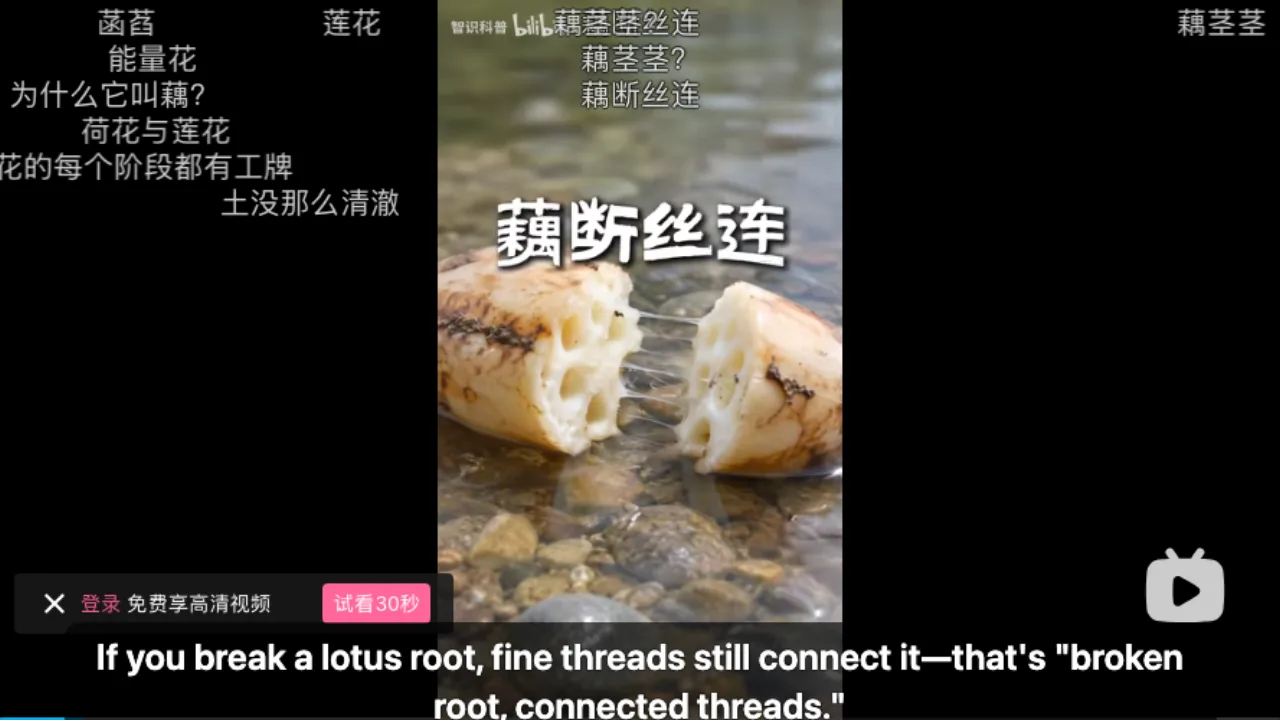
 WTIf you break a lotus root, fine threads still connect it.
Press Start, then play
Subtitles follow playback and stay in step when you pause or skip.
Translation that keeps up with the picture
On the player you already use
No new window and no downloaded copy: subtitles sit on the site's own player.
Subtitles or no subtitles
An existing track is translated; with none, the speech is recognised first.
Dual lines when you want them
Your language on top and the original smaller below, or translation only.
What people translate as they watch
Foreign films on your computer
Downloaded films in the web player or desktop app.
Series episodes
Episodes on official free channels, one after another.
YouTube channels
Vlogs, talks and interviews in languages you don't speak.
Chinese videos on Bilibili
Narrated uploads in Mandarin.
News clips on X
Short outlet clips with sound only.
Videos on an Android phone
Files on the phone and web videos in the app's browser.
Why not find a subtitle file instead?
If a good subtitle file in your language exists, use it. Translating as you watch helps when it doesn't, or when finding one takes longer than the video.
| The usual way | What it takes | With WatchTranslate |
|---|---|---|
| Search for a subtitle file | Find, download, match the version | Nothing to find; press Start |
| Site's own auto-translate | Needs existing captions, one language | Works without captions, two lines |
| Translate the whole file first | Wait before watching | Starts in seconds, keeps pace |
| Watch with no subtitles | Guess from the picture | Read along in your language |
Translating ahead of time is also available when you prefer it.
What we tried
On a computer with the live extension, signed out of the sites, pressing Start and playing.
- Works
Chinese science short on Bilibili · about 4 s
First English line about 4 seconds after Start, then line by line with the narration.
- Works
Spanish TEDx talk on YouTube · about 7 s
English from the Spanish audio, the original line below.
Tested 9 Nov 2026 · extension 0.5.737 · Chrome · signed out
Watch on your phone
Scan to get the app
Then open what you want to watch, press Start and play.
In detail
Where to translate what you're watching
| What you're watching | Use | Worth knowing |
|---|---|---|
| YouTube, X, Bilibili in a browser | The extension | WT on the player; other sites: the toolbar icon |
| A film on your computer | Web player or desktop app | The file is never uploaded as a whole |
| Videos on an Android phone | The WatchTranslate app | Also its built-in browser for web videos |
| A live stream | Live translation (beta) | Apply at watchtranslate.com/live first |
What "while watching" means here
Translating while you watch means subtitles are produced just ahead of where you are, rather than for the whole video before you start. WatchTranslate works through the playing video about 30 seconds at a time: the part you're on and the next. That is why the first line appears seconds after you press Start, and why skipping simply moves the work to where you landed.
With the video's own subtitles
If the video has a subtitle track in another language, that text is translated directly: faster, and 0.2 credits a minute.
With no subtitles at all
Audio recognition writes the original line from the speech and then translates it: 1 credit a minute, with failed windows not charged.
When you'd rather not wait at all
For long films and lectures, prepare the whole video in advance; parts already translated are not charged again if you stop and continue later.
How the subtitles keep pace
Will the subtitles stay in sync?
Yes. Each line carries the video's own timing and is shown on the original player, so it matches the dialogue when you pause or rewind.
Why does translation read naturally?
A large language model translates each line with the sentences around it in view, so names and references carry through.
What if someone already translated this video?
Finished subtitles are kept by video, source and language, so parts someone already translated the same way can usually be reused; you are only charged for parts that still need making.
What YouTube's own translation needs
From the YouTube Help Center, checked signed out of YouTube on .
YouTube's automatic captions come from speech recognition and are not available on every video, so its translated captions aren't either.
support.google.com/youtube/answer/6373554
Watch smoothly from the first line
Press Start before Play
The first stretch is ready a few seconds later, as the video begins.
Use the track when there is one
Existing subtitles translate faster and cost less.
Prepare long films ahead
For a two-hour film, prepare it and skip freely.
Keep the original for names
Dual lines keep character names exactly as said.
About translating while you watch
Is there automatic translation while a movie plays?
Yes. Press Start translation once and subtitles keep coming as it plays, in the language you picked.
Will the subtitles stay in sync?
Yes. They carry the video's timing and stay matched when you pause or rewind.
Can I translate a video's English subtitles into another language?
Yes. Translating existing subtitles is faster and uses fewer credits.
How long until the first line?
A few seconds; about 4 seconds on Bilibili and 7 on YouTube in our 9 November tests.
Does it work on films on my computer?
Yes, in the web player or the Windows and Mac app.
Does it work on my phone?
On Android, the app translates videos on the phone and web videos in its built-in browser.
Does it work on live streams?
Live streams use Live translation (beta); apply at watchtranslate.com/live first.
What does it cost?
New accounts get 20 free minutes. If someone already translated the same parts the same way, those can usually be watched without new charges.
Which languages?
74 subtitle languages; pick any as your target.
One tool to understand foreign-language videos on many sites
Translates as you watch, wherever you are in the video
Jump anywhere and it translates there — no need to translate the whole video first.
Translate videos on YouTube, X, Bilibili and more
Translate existing subtitles directly, or generate bilingual subtitles when there are none.
Better translation quality than traditional machine or real-time translation
AI language models use context and connect the surrounding dialogue to understand meaning.
Export subtitles as SRT / VTT files
Download generated subtitles as original, translated, or bilingual text and load them in common players.
Already translated by someone? Watch it free
Sign up free to reuse generated subtitles for the same video, subtitle source and languages, even after your credits run out.
Bilingual subtitles on your phone
Play video files on your phone, or open a video site in the app's built-in browser and tap Translate. A native player handles more video formats than the web player.
Keep reading
Related questions
- Translate a full video in advanceFor long films
- Bilingual subtitlesTwo lines at once
- Web video with no subtitle trackTrack or no track
Sites
Choosing a tool
More: All guides · Supported sites