
20 free points on sign-up
Watch
like a native.
Translates as you watch, wherever you are in the video. AI-powered bilingual subtitles in 74 languages. Videos from YouTube, X, Bilibili and more sites and local videos work without downloading or uploading the original video, even without subtitles. Supported sites
Download for WindowsDownload for MacOther devices and downloads
Store version {0} · reviews are slow, so you can download the latest ZIP {0}
- Translate videos on YouTube, X, Bilibili and moreTranslate existing subtitles directly, or generate bilingual subtitles when there are none.
- Better translation quality than traditional machine or real-time translationAI language models use context and connect the surrounding dialogue to understand meaning.
- Export subtitles as SRT / VTT filesDownload generated subtitles as original, translated, or bilingual text and load them in common players.
- Already translated by someone? Watch it freeSign up free to reuse generated subtitles for the same video, subtitle source and languages, even after your credits run out.
Start using
Three ways to watch
Same account and points everywhere. Pick what fits your device.
Watch unsubtitled videos bilingually
Install the browser extension and click the translation icon in the video's own player to generate bilingual subtitles as you watch.
Install it on your computer — subtitles appear right inside YouTube.
Videos on your phone or computer, translated in your browser
Open the web player and choose a local video to start, with no software to install. Your video stays on your device; subtitles are generated as you watch.
Plays what your browser can't
Bilingual subtitles on your phone
Translate local videos on your computer, including formats your browser cannot play.
Play video files on your phone, or open a video site in the app's built-in browser and tap Translate. A native player handles more video formats than the web player.
Online videos? Use the browser extension.

Why it's faster
Others make you wait. We translate as you watch.
Upload-based subtitle tools
- Download the video
- Upload it to the tool
- Wait for the whole video to process
- Download the subtitle file
- Load it into a player and start watching
The longer the video, the longer the wait
WatchTranslate
- Open the video
- Click the translate icon
- Keep watching as subtitles appear
Jump anywhere and it translates there — no need to translate the whole video first.
Side by side
Beyond built‑in translation
| Feature | Built-in translation | WatchTranslate |
|---|---|---|
| When a video has no captions | Built-in translationUsually can't translate | WatchTranslateTranscribes the speech, then translates |
| Translation method | Built-in translationMostly traditional machine translation, line by line | WatchTranslateAI language models use the surrounding dialogue for more accurate, more natural subtitles |
| Subtitle display | Built-in translationUsually the translation only | WatchTranslateOriginal, translation, or both together |
| Where it works | Built-in translationOnly inside each platform | WatchTranslateYouTube, X, Bilibili and local videos |
Make it yours
Choose how your subtitles look
Adjust font size, line spacing, background and position, and switch between original, translated or bilingual subtitles. Make subtitles fit your screen and the way you watch.
Built for real viewing
Ready wherever you watch
- 74languages
From English, Japanese and Korean to Turkish, Arabic and Hindi.
- 5ways in
Chrome · Windows · Mac · Android · iPhone
Supported sites - Hundredsof hours of video translated
Across thousands of videos in 40 spoken languages.
Questions
Frequently asked questions
Which videos and devices work, and how do I start?
Works on YouTube, X, Bilibili, TED and more: use the extension on a computer, the app on your phone. Supported sites
| Viewing method | Online videos | Local videos |
|---|---|---|
| Desktop extension | Translate on the video page | — |
| Desktop appWindows · Mac | Use the desktop extension | Open local files, more formats than a browser |
| Phone appAndroid · iPhone | Try translating in the built-in browser | Open a local video file |
| Web player | — | Open in a computer or phone browser |
Create a free account to get started.
Can I translate videos without subtitles, and how does it differ from platform translation?
- Subtitle source: Yes: when usable subtitles are absent, we recognize speech and translate it; supported native or embedded text subtitles are translated directly, faster and with fewer points.
- The difference: Platform translation usually needs existing subtitles; we can also generate missing ones and display the original, translation or both.
Which languages are supported?
- Subtitle language: Translate subtitles into 74 languages.
- Interface languages: Choose from a separate set of 14 interface languages.
- Source language: For audio recognition, the source language can be detected automatically or set manually; local embedded subtitles use the track’s declared language.
All 74: 简体中文 / 繁體中文 · English · 日本語 · 한국어 · Español · Français · Deutsch · Português · Русский · العربية · हिन्दी · Bahasa Indonesia · Italiano · Nederlands · Polski · Čeština · Dansk · Suomi · Ελληνικά · Norsk · Română · Svenska · Hrvatski · Српски · Українська · Català · فارسی · עברית · Türkçe · اردو · বাংলা · ગુજરાતી · ಕನ್ನಡ · मराठी · नेपाली · ਪੰਜਾਬੀ · தமிழ் · తెలుగు · ລາວ · Bahasa Melayu · Filipino · ไทย · Tiếng Việt · Български · Afrikaans · Azərbaycan · Bosanski · Cymraeg · Eesti · Euskara · Føroyskt · Galego · Magyar · Հայերեն · Íslenska · Basa Jawa · ქართული · Қазақша · ខ្មែរ · Latina · Lëtzebuergesch · Lietuvių · Latviešu · Македонски · മലയാളം · Nynorsk · Occitan · Slovenčina · Slovenščina · Shqip · Basa Sunda · Тоҷикӣ · Oʻzbekcha · 粵語
How good is the translation quality?
Recognition and translation are both done by large models, processing 30-second segments with context. Accents, background music, overlapping speakers and technical terms can still cause errors, so treat subtitles as a reference.
How long before subtitles appear?
They are generated as you watch: the first line appears shortly after you click translate, then the rest follows with playback — no waiting for the whole video. Segments already generated are reused instantly.
Can it translate live streams?
Yes, it's in beta. Open the live stream on your computer, choose Live translation in the Chrome extension, and captions appear about a second after someone speaks. Apply for the beta
Coming soon to phones. Leave your email and we'll let you know
Translation not working or acting up?
- Update first: Many issues are already fixed in newer versions, so first make sure the extension or app is up to date. Your extension version is visible on its card in chrome://extensions.
- Latest versions: store install · ZIP install
- Store install — how to update: It updates automatically, usually within a few hours — nothing to do. In a hurry: turn on Developer mode at the top right of chrome://extensions and click Update on the extension card to check immediately (the toggle is just a Chrome UI requirement).
- ZIP install — how to update: The ZIP install has no auto-update channel, so it is manual: download the new ZIP, extract it over the old folder, then click Reload on the extension card. Download latest ZIP
- Still stuck: Reload the video page and click Translate again. If the problem persists, email [email protected] with the video link.
Is it free? How is it billed?
- New subtitles: Sign-up includes a one-time 20 points: audio recognition costs 1 point/minute and existing subtitle translation 0.2 points/minute.
- Processing charges: Segments without speech are charged; completely silent segments and failed processing are not.
- Free reuse: Completed subtitles for the same video, source and languages are free to reuse across accounts, even with no points left.
- Subscriptions: Monthly plan points arrive each month and don't roll over; annual plans bought on the website get the whole year's points at once after payment, valid for 12 months.
Can I export subtitle files?
Yes. Generated subtitles can be exported as SRT or VTT files with original, translated, or bilingual text. Only generated segments are included; exporting does not fill missing segments.
Is my video uploaded, and what does sharing make public?
- What is sent: The original video is not uploaded. Audio segments or subtitle text needed for processing are sent to the service; see the privacy policy for retention and exceptions.
- Original video: Share links send viewers back to YouTube / X, without hosting the video.
- Public information: Video and language information you actively share is public in the subtitle catalog and may be indexed by search engines.
Browser extension · Install & useEnable subtitle translation directly within the native players on YouTube and X / Bilibili.
Installation steps
- Open the Chrome Web Store and click “Add to Chrome”.
- Pin WatchTranslate to your browser toolbar.
- Open the extension and log in. You need to log in separately on the website and in the extension.
- Open a YouTube or X / Bilibili video and click the translation icon in the player controls to start translating.
When switching from ZIP to the Store version, disable the old extension and sign in and configure the Store version again to avoid duplicate subtitles.
Install ZIP manually
- Download and unzip the ZIP, then open chrome://extensions/ in Chrome's address bar: turn on the Developer mode switch in the top right, click Load unpacked in the top left, and select the unzipped folder.
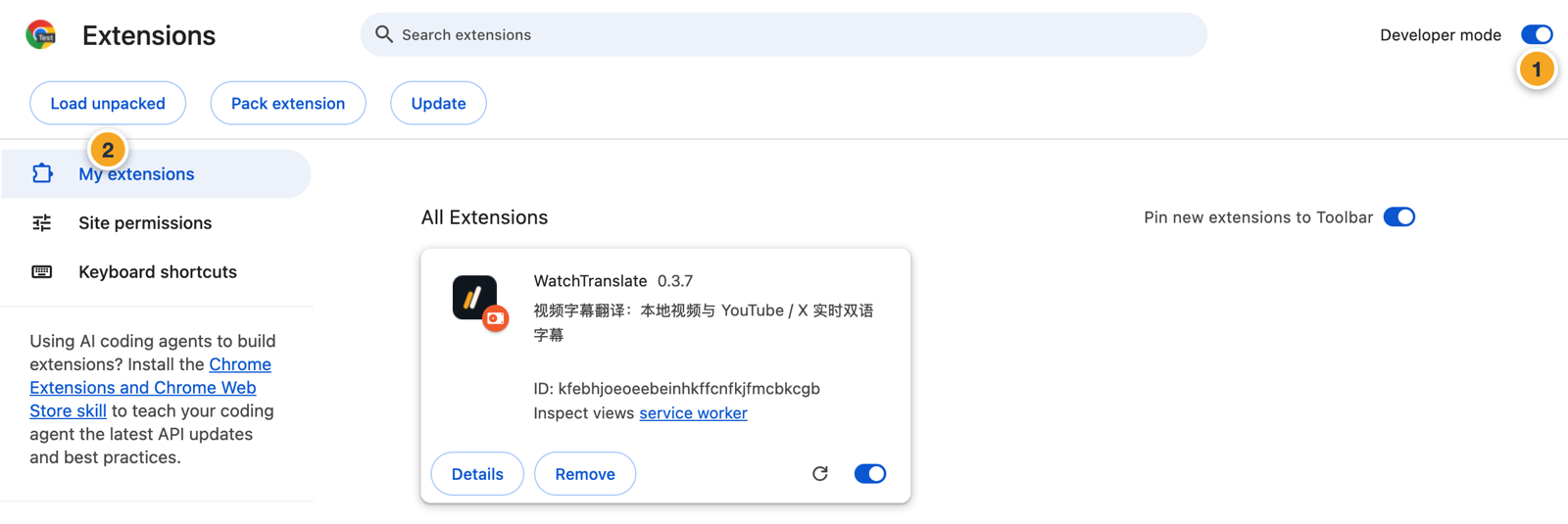
Disable the old extension before updating to avoid displaying subtitles from both versions simultaneously. For first-time installation of this downloaded version, log in and configure again; subsequent updates should be done within the same folder.
Watch
like a native.
Start free — 20 points on sign-up.