
LLPlayer alternative: AI subtitles on a Mac, a phone or in the browser
LLPlayer is a free GPL-3.0 player for Windows 10 and 11: Whisper turns the soundtrack into subtitles on your own PC, and a translation engine of your choosing turns them into your language. No Windows PC at hand, or no wish to fetch models and runtimes? On a computer, load the film into the WatchTranslate local player in a browser tab and press Start translation; on a phone, use the Android or iPhone app.
LLPlayer next to three other options
How each tool gets you from a soundtrack with no usable subtitles to lines you can read, quoting each project's own pages; check dates sit at the bottom.
| Platforms | Subtitles from the audio | Getting them translated | Setup before the first line | |
|---|---|---|---|---|
| WatchTranslate | A browser tab on Windows or Mac, plus apps for Windows, Mac, Android and iPhone[1, 2, 3] | Listens to the dialogue during playback and turns it into lines[1] | Included: choose a target language, keep the source line on screen too if wanted, save as SRT or VTT[1, 4] | Nothing to install: sign in, choose a language, then Start translation[1] |
| LLPlayer | Windows only (Windows 10 x64 1903+ or Windows 11 x64)[5, 6] | OpenAI Whisper writes subtitles from the audio in real time, on your computer; 100 languages[6, 5] | Engine of your choice, 141 languages: Google V1 by default, free ones without an account, paid ones with an API key, or local Ollama and LM Studio; two subtitles at once[7, 5, 6] | .NET Desktop Runtime 10 and the VC++ redistributable, plus the Whisper engine and models downloaded in the app; Google V1 translates by default, other engines are optional[6, 7] |
| PotPlayer | Windows 11, 10, 8.1, 8 and 7; no other systems listed[8] | Its changelog adds Whisper-based subtitle creation from speech, live as well[9] | Handed to online translators you connect; the translated text can be stored together with the subtitles[9] | Decide which Whisper engine and which translator to use[9] |
| Subtitle Edit | Windows, macOS and Linux[10] | An editor, not a player: speech to text through Whisper-type engines you install, fetched with their models automatically the first time[11] | Auto-translate with a choice of engines, many of them asking for your own API key; the saved file then goes into a player[12, 10] | A speech engine and model, a translation key for most engines, and a separate player to watch in[11, 12] |
Put together by WatchTranslate from its own pages and those of each project; WatchTranslate is not affiliated with LLPlayer, PotPlayer or Subtitle Edit.
When LLPlayer isn't the easiest fit
LLPlayer, still marked Beta, is a C# player for Windows. Whisper (whisper.cpp or faster-whisper) recognises speech locally, on the CPU by default with CUDA or Vulkan as options; it can put two subtitle lines on screen together and open a URL through its built-in yt-dlp. The usual reasons to look elsewhere: the film lives on a Mac or a phone, you'd rather skip the runtime installs and model downloads, or you want translated lines without assembling recognition and translation yourself.
No Windows PC? A Mac, a phone or a browser tab
LLPlayer's homepage describes it as Windows-only for now, and the README asks for Windows 10 x64 version 1903 or newer, or Windows 11 x64, with Linux and Mac support placed on the future roadmap. WatchTranslate needs no install to begin: its local player is a web page you open on Windows or Mac. The Windows and Mac apps play MKV, AVI and HEVC too, and videos stored on a phone open in the Android and iPhone apps. A single account and one pool of credits covers every one of them.
Skipping the setup list
Before LLPlayer shows its first generated line, setup typically means installing .NET Desktop Runtime 10 and the Visual C++ 2022 redistributable, letting the app download a Whisper engine and model, and deciding on a translator: Google V1 works out of the box, while Azure, DeepL, OpenAI and Claude want an account or key. WatchTranslate has no such list. Choose your language and press Start translation; speech is transcribed and translated while the film runs, and the source line can sit beside the translation. To have everything ready in advance, Start whole-video translation works through the film from the beginning, and a file that already contains a text subtitle track can have that track translated rather than its audio.
PotPlayer and Subtitle Edit
PotPlayer is another Windows-only option; according to its changelog a Whisper engine creates subtitles from speech, live too, and online translators you connect handle the language step. Subtitle Edit runs on Windows, macOS and Linux but is a subtitle editor rather than a player: you transcribe with a Whisper-type engine that downloads itself on first use, auto-translate with an engine that often needs your own API key, save the file, and then watch it in some other player.
Staying with LLPlayer
On a Windows machine, if a free, open-source player doing recognition on your own hardware is exactly what you want, LLPlayer suits you well; point it at Ollama or LM Studio and translation stays on the PC too. Reach for WatchTranslate when the film is on a Mac or a phone, when you'd rather configure nothing, or when you want to export the translated subtitles as SRT or VTT.
Looking wider than LLPlayer
Here the question is only what replaces LLPlayer. For a broader survey of players that generate subtitles, see the video players with AI subtitles comparison; PotPlayer users have a page of their own on PotPlayer alternatives.
Our own run: desktop and phone widths
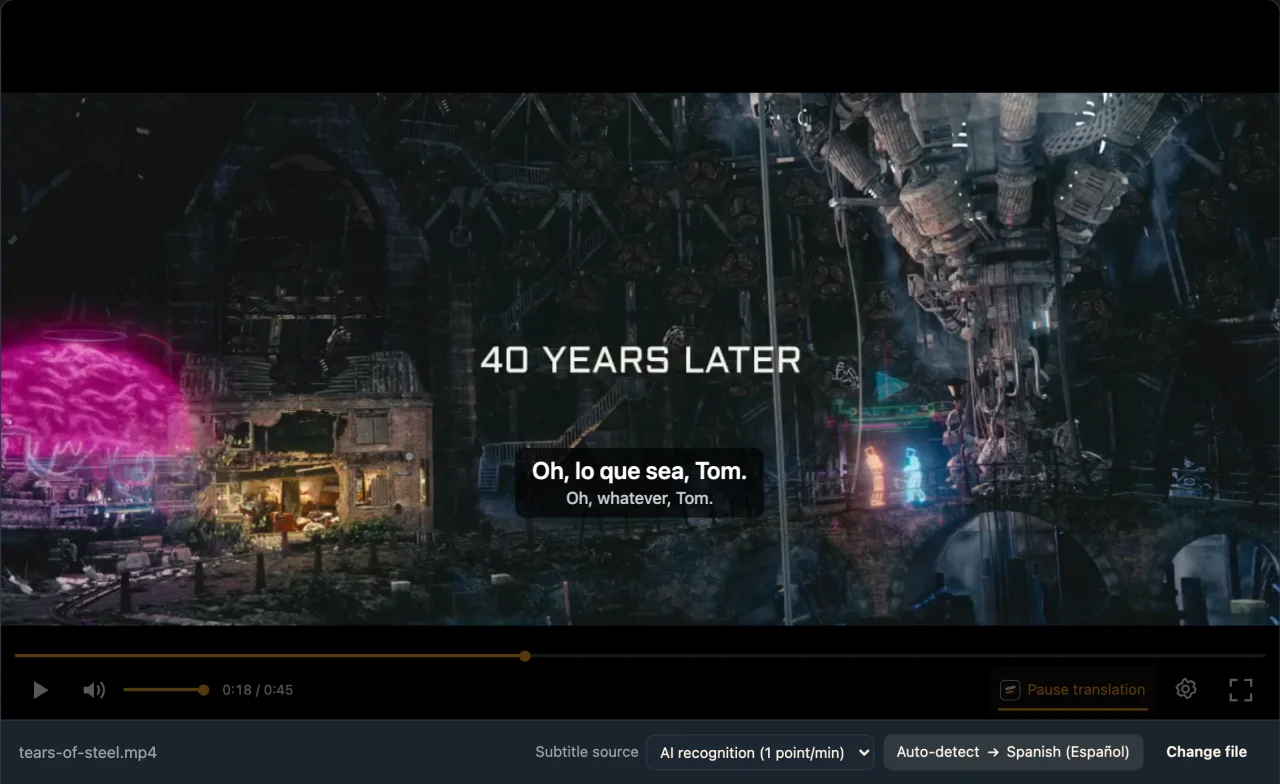
We played an open-movie clip with English dialogue in the production web local player, in Chrome, signed in to a WatchTranslate account.
- Works
Desktop window · first line in about 6 s
Spanish picked as the target, AI recognition on; roughly 6 s passed between pressing Start translation and the first subtitle.
- Works
390-wide touch screen (emulated) · about 7 s
A different part of the same clip, played in desktop Chrome set to emulate a phone-sized touch screen.
Tested 11 Nov 2026 · web local player · Chrome · live service
No Whisper model to fetch and no translator to configure: drag the film into the player and start.
LLPlayer alternatives: common questions
Which LLPlayer alternative works without installing anything?
WatchTranslate. Its local player is a web page: drag in the film, choose a language and press Start translation. The Windows and Mac apps play MKV, AVI and HEVC, and there are Android and iPhone apps as well.
Is LLPlayer free?
Yes, it is open-source software under GPL-3.0 and costs nothing. Money only comes in with some of the translators it supports: OpenAI and Claude bill you through your own API key.
Is there an LLPlayer for Mac?
Not at the moment. Its homepage says only Windows is available for now, and its roadmap lists Linux and Mac as future work. Mac users can open the WatchTranslate local player in a browser or install the Mac app.
Do I need an API key for LLPlayer?
Not to get started. Google V1, the default translator, needs no account, and neither do Bing or DeepLX. Azure and DeepL ask for an account or key; OpenAI and Claude are paid and key-based.
Can LLPlayer run offline?
Recognition can: once the app has downloaded the Whisper engine and model, it runs on your PC. Translation stays local only with Ollama, LM Studio or KoboldCpp; the other engines are online services.
What does LLPlayer need installed on Windows?
Windows 10 x64 (1903 or newer) or Windows 11 x64, .NET Desktop Runtime 10 and the Visual C++ 2022 or later redistributable. Whisper uses the CPU by default, with CUDA or Vulkan as options.
Is LLPlayer available for Android or iPhone?
Its site lists Windows only. For a phone, install WatchTranslate for Android or iPhone; on Android the local player also opens in the mobile browser.
Does WatchTranslate upload my whole video?
No. It sends short pieces of audio, or only the subtitle text when you translate a track the file already has; the complete file is never uploaded.
Can I translate a film ahead of time and keep the subtitles?
Yes. Start whole-video translation works through the film before you watch; stop partway and the next run resumes without billing the finished part again. Afterwards, export SRT or VTT for any player that reads them.
How is WatchTranslate priced?
You get 20 minutes free without adding a card. After that, subtitles made from the audio use 1 credit per minute, and translating a subtitle track the file already has uses 0.2 credit per minute.
Sources (checked on the date shown)
- watchtranslate.com/guides/watch-local-video-without-subtitles ·
- watchtranslate.com/app/download ·
- watchtranslate.com/guides/phone-local-video-subtitles ·
- watchtranslate.com/guides/export-video-with-subtitles ·
- llplayer.com/ ·
- github.com/umlx5h/LLPlayer ·
- github.com/umlx5h/LLPlayer/wiki/Translation-Engine ·
- potplayer.tv/?lang=en ·
- t1.kakaocdn.net/potplayer/PotPlayer/v4/Update2/UpdateEng.html ·
- github.com/SubtitleEdit/subtitleedit ·
- subtitleedit.github.io/subtitleedit/features/speech-to-text.html ·
- subtitleedit.github.io/subtitleedit/features/auto-translate.html ·