
PotPlayer alternative: what else gives you AI subtitles?
PotPlayer is a Windows player whose Whisper engine can write subtitles from the audio, with translation through separate online engines. On a Mac or a phone, or if you'd rather not choose engines, open the film in the WatchTranslate local player and press Start translation.
PotPlayer and three alternatives
What each one does with a film that has no subtitles in your language, in its makers' own words; check dates are listed under the page.
| Where it runs | Film with no subtitles | Translation | |
|---|---|---|---|
| WatchTranslate | In the browser on Windows or Mac; Windows, Mac, Android and iPhone apps[1, 2, 3] | Writes subtitles from the speech as the film plays[1] | Built in, into the language you pick, original alongside if you like; export SRT or VTT[1, 4] |
| PotPlayer | Windows only (11, 10, 8.1, 8 and 7)[5] | Whisper engine generates subtitles from voice, including real-time generation[6] | Separate online translation engines; the translation can be saved with the subtitles[6] |
| VLC | Windows, macOS, Linux, Android, iOS and more[7] | Release 3.0.24 has no AI subtitle generation[8] | None shipped; an AI live subtitle generator was shown at FOSDEM 2026[8, 9] |
| Windows Live Captions | Built into Windows 11[10] | Captions any audio in a separate window; not saved[10] | Into English or Simplified Chinese only, on Copilot+ PCs[10] |
Compiled by WatchTranslate from its own pages and each vendor's; we have no affiliation with PotPlayer, VideoLAN or Microsoft.
Why people look beyond PotPlayer
PotPlayer is a long-standing Windows player, and its changelog keeps adding subtitle features: subtitles from voice through Whisper from December 2024, more engine options and engine updates in 2025, real-time generation from audio from September 2025, and online subtitle translation through separate engines. People usually start looking for something else for one of three reasons: the film is on a Mac or a phone, they'd rather not choose between engines and translators, or they want one step from the audio to subtitles in their own language.
On a Mac, a phone or any computer with a browser
PotPlayer's site lists Windows 11, 10, 8.1, 8 and 7. WatchTranslate's local player opens in the browser on Windows and Mac with nothing to install; the Windows and Mac apps play MKV, AVI and HEVC, and the Android and iPhone apps handle the videos on your phone. One account and the same credits work on all of them.
From the audio to your language in one step
Pick a language and press Start translation. The dialogue is written down and translated as the film plays, with the original line alongside if you want it, and there is no recognition engine or separate translator to choose. For a whole film, Start whole-video translation prepares the subtitles in order before you sit down; if the file already carries a text track, you can translate that track instead of the audio.
VLC and Windows Live Captions
VLC is free and runs on almost every system, but its current release, 3.0.24, has no AI subtitles; VideoLAN showed an AI live subtitle generator at FOSDEM 2026. Windows Live Captions caption any audio in their own window, translate only on Copilot+ PCs and only into English or Simplified Chinese, and don't keep the captions.
When PotPlayer is still the right pick
If you're on Windows, already know PotPlayer and are happy choosing among its Whisper options and translation engines, it may be all you need. WatchTranslate is for the evening you want a film in your language on whatever device you're holding, with the subtitles kept: export them as SRT or VTT, and the SRT opens in PotPlayer too.
Not tied to PotPlayer?
This page is about replacing PotPlayer. For a wider look at players that write subtitles, macOS Live Captions included, see Which video player has AI subtitles?; to choose a route by the device your file is on, see How do I add subtitles to a video file?
On a computer and at phone width
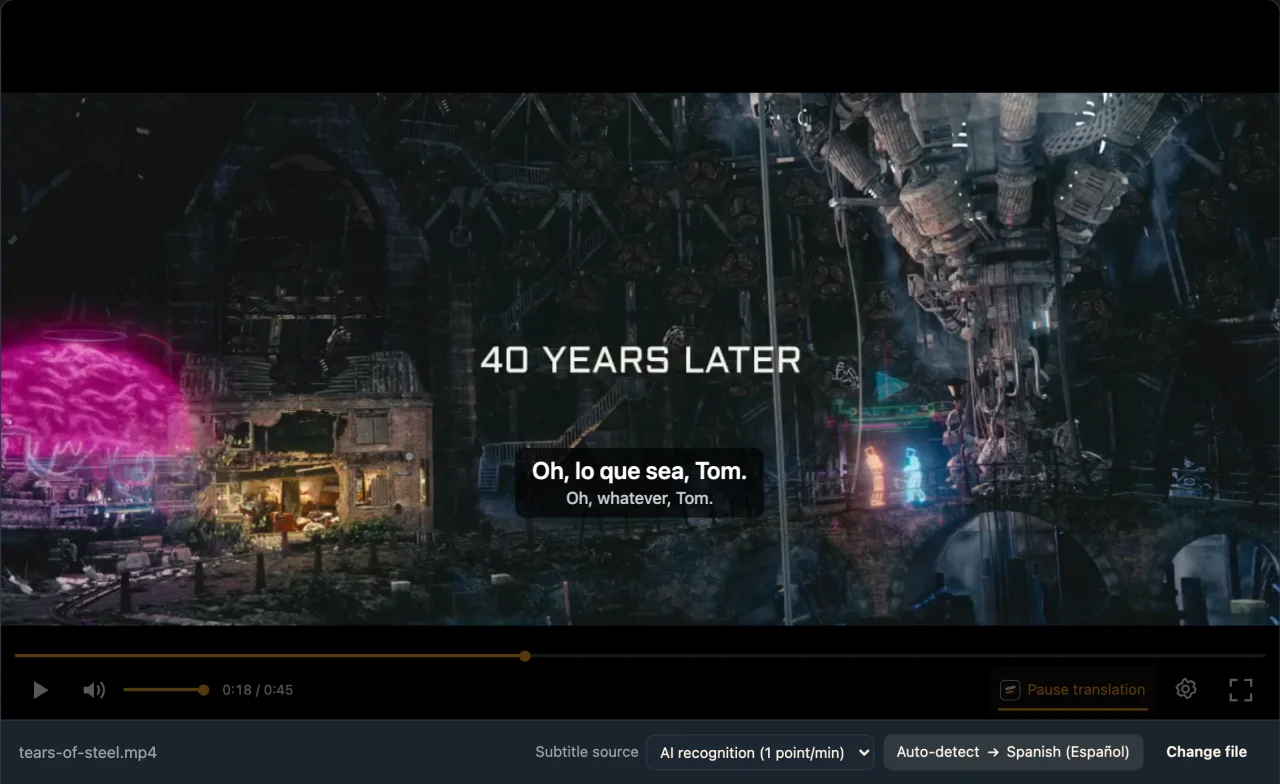
The live web local player in Chrome, signed in to WatchTranslate, with an English-dialogue open-movie clip.
- Works
Computer width · about 6 s
AI recognition, Spanish chosen for the test; first line about 6 s after Start translation.
- Works
Phone width (emulated) · about 7 s
Same film, another excerpt, in desktop Chrome emulating a 390-wide touch screen.
Tested 11 Nov 2026 · web local player · Chrome · live service
Drop a film into the local player; there's no engine to pick.
About PotPlayer alternatives
What is a good PotPlayer alternative for AI subtitles?
For translated subtitles without choosing engines, WatchTranslate: open the film in its local player in the browser, or in the Windows or Mac app, and press Start translation.
Is there a PotPlayer for Mac?
PotPlayer's own site lists Windows versions only. On a Mac, use the WatchTranslate local player in your browser or the Mac app.
Why are PotPlayer's AI subtitles not working?
We can't diagnose PotPlayer itself. Its changelog shows the feature runs through a Whisper engine with options such as Faster-Whisper-XXL, and translation through separate online engines. If you just want the film subtitled, open it in the WatchTranslate local player instead.
Can PotPlayer translate subtitles?
Yes. Its changelog adds online subtitle translation through separate engines, Yandex among them, and an option to save the translation with the subtitles.
Does VLC have AI subtitles like PotPlayer?
Not in the current release, 3.0.24. VideoLAN showed an AI live subtitle generator at FOSDEM 2026.
Can I watch on my phone instead?
Yes, with the Android or iPhone app; on Android, the phone browser works too.
Is my video uploaded?
Not as a whole file; only audio pieces, or subtitle text for a track, are sent.
Can I keep the subtitles and use them in PotPlayer?
Yes. Export SRT or VTT; PotPlayer lists SRT among the subtitle formats it opens.
Can I translate a whole film before watching?
Yes, with Start whole-video translation; stop halfway and the next run picks up where it left off without charging twice.
What does it cost?
20 minutes free with no card, then 1 credit a minute from the audio and 0.2 for an existing subtitle track.
Keep reading
Related comparisons
More: All guides · Local player
Also in: 简体中文 · 繁體中文 · 日本語 · 한국어 · Español · Deutsch · Français · Português · Italiano · العربية · Polski · Nederlands · Türkçe · Bahasa Indonesia · Tiếng Việt · Русский · हिन्दी
Sources (checked on the date shown)
- watchtranslate.com/guides/watch-local-video-without-subtitles ·
- watchtranslate.com/app/download ·
- watchtranslate.com/guides/phone-local-video-subtitles ·
- watchtranslate.com/guides/export-video-with-subtitles ·
- potplayer.tv/?lang=en ·
- t1.kakaocdn.net/potplayer/PotPlayer/v4/Update2/UpdateEng.html ·
- www.videolan.org/vlc/ ·
- www.videolan.org/vlc/releases/3.0.24.html ·
- www.videolan.org/news.html#news-2026-01-31 ·
- support.microsoft.com/en-us/windows/use-live-captions-to-better-understand-audio-b52da59c-14b8-4031-aeeb-f6a47e6055df ·