
Need a Subtitle Edit alternative just to watch a video?
Subtitle Edit is an excellent free editor for making and timing subtitle files; its auto-translate and speech-to-text work on the file, and most of its translation engines want your own API key. If you only want to watch the video in your language, open it in the WatchTranslate local player and press Start translation: subtitles appear while it plays.
Watching with subtitles vs making a subtitle file
Our two routes next to the desktop tools people use for subtitle files; outside claims quote the projects' own pages, dated under the page.
| Where it runs | Video with no subtitles | Getting it translated | |
|---|---|---|---|
| WatchTranslate | In the browser on Windows or Mac; Android and iPhone apps[1, 2] | Writes subtitles from the speech while it plays[1] | Built in, into the language you pick; export SRT or VTT[1, 3] |
| WatchTranslate desktop app | Windows and Mac, for MKV, AVI and HEVC[4] | Same subtitles from the speech[4] | Same translation and export[4, 3] |
| Subtitle Edit | Desktop app for Windows, macOS and Linux[5] | Whisper-based speech to text; engines and models download on first use[6] | Many engines and AI services, most needing your own API key; results reviewed in the grid[7] |
| MKVToolNix + Subtitle Edit | Desktop tools for Windows, macOS and Linux[5, 8] | mkvextract pulls an existing subtitle track out of an MKV file[9] | The extracted file is then translated in Subtitle Edit[9, 7] |
Compiled by WatchTranslate from its own pages and each project's; we have no affiliation with Subtitle Edit or MKVToolNix.
An editor and a player solve different problems
Subtitle Edit is built for working on subtitle files: timing, formats and fixing lines. Its auto-translate fills a translation you review line by line in a grid, and its speech-to-text writes a subtitle file from the audio. That is exactly right when the file is the goal. When the goal is to sit down and understand a film tonight, every one of those steps stands between you and the film.
Translated while it plays
Drop the file into the WatchTranslate local player, pick your language and press Start translation. The dialogue is written down and translated as the film plays, with the original line alongside if you like. In the browser there is no translation engine to choose, no API key to paste and no model to download.
No API key; pay by the minute
Subtitle Edit's auto-translate page lists a couple of engines that work without a key, Google Translate V1 and MyMemory, plus self-hosted options such as LibreTranslate and Ollama; most of the rest need your own key from each provider. WatchTranslate includes the translation: 20 minutes free with no card, then 1 credit a minute from the audio, or 0.2 credits a minute to translate a text track the file already has.
The file stays on your computer
Your video isn't uploaded as a whole. The Windows and Mac apps also play MKV, AVI and HEVC. When a file carries an embedded text track, WatchTranslate lists it so you can translate it directly, without extracting it first. A whole film can be prepared in advance with Start whole-video translation.
Keep editing in Subtitle Edit if you want
When you're done watching, export the subtitles as SRT or VTT. Open the SRT in Subtitle Edit to adjust timing, fix a name or restyle lines; the two tools work well together rather than against each other.
Where Subtitle Edit is the better tool
For subtitles you will publish, matching a release's timing, converting formats or preparing a file for someone else, stay with Subtitle Edit. It is free, open source under the MIT license, and runs on Windows, macOS and Linux.
Looking for a player instead?
This page compares against an editor. If you want a video player with AI subtitles in general, see Which video player has AI subtitles?; to choose by the device your file is on, see How do I add subtitles to a video file?
On a computer and at phone width
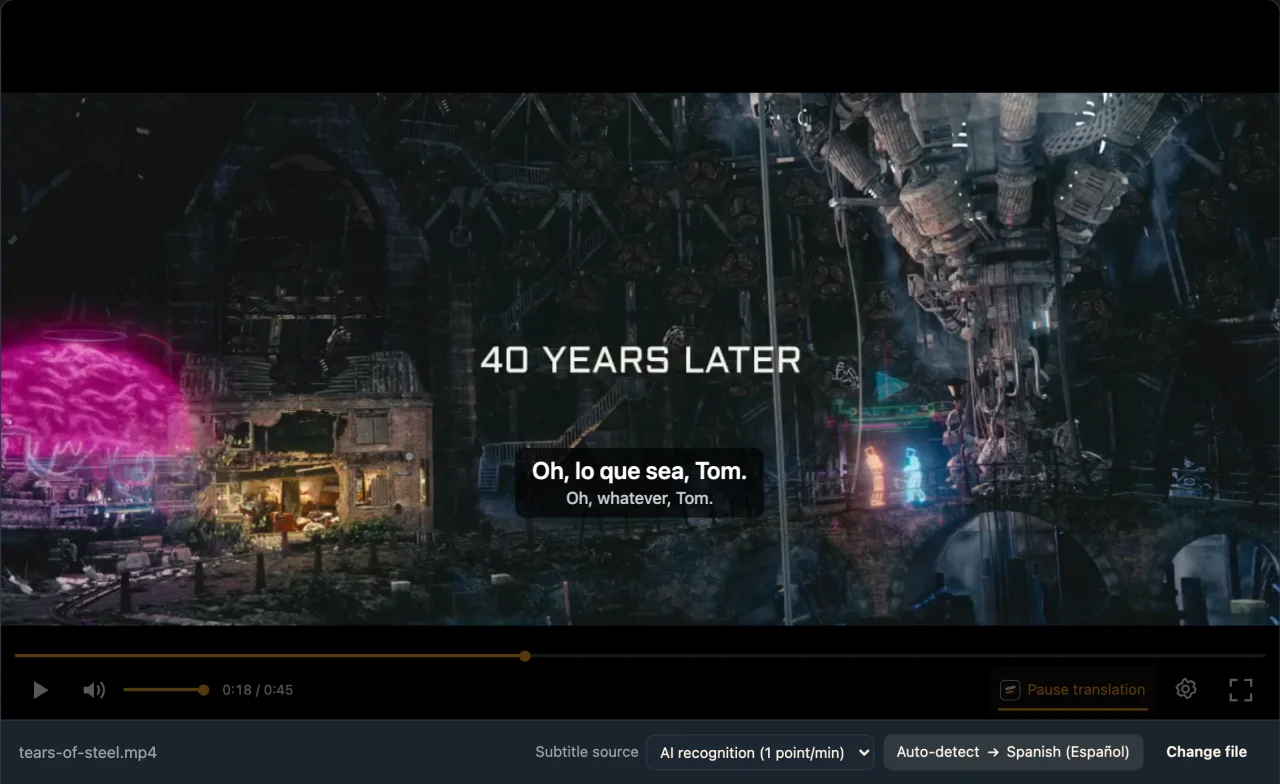
The live web local player in Chrome, signed in to WatchTranslate, with an English-dialogue open-movie clip.
- Works
Computer width · about 6 s
AI recognition, Spanish chosen for the test; first line about 6 s after Start translation.
- Works
Phone width (emulated) · about 7 s
Same film, another excerpt, in desktop Chrome emulating a 390-wide touch screen.
Tested 11 Nov 2026 · web local player · Chrome · live service
Watch first; edit later only if you need to.
About Subtitle Edit alternatives
What is a good Subtitle Edit alternative for translating videos?
If you want to watch rather than edit, WatchTranslate: open the video in its local player and translated subtitles appear while it plays.
Does Subtitle Edit auto-translate need an API key?
Most engines do. Its documentation lists Google Translate V1 and MyMemory as free, plus self-hosted options such as LibreTranslate and Ollama.
Can Subtitle Edit generate subtitles from audio?
Yes, with Whisper-based and other speech recognition engines; the engines and models download on first use.
Do I need an API key or a model download for WatchTranslate?
No. Translation is included, and in the browser there is nothing to install.
Can I edit WatchTranslate subtitles in Subtitle Edit?
Yes. Export SRT or VTT and open the file in Subtitle Edit to change timing or wording.
Is my video uploaded?
Not as a whole file; only audio pieces, or subtitle text for a track, are sent.
Does it work with MKV files?
Yes. The Windows and Mac apps play MKV, AVI and HEVC, and a file with a readable text track can have that track translated for 0.2 credits a minute.
Do I need MKVToolNix first?
Not for WatchTranslate, which lists embedded text tracks itself. The MKVToolNix route uses mkvextract to pull the track out before translating it in Subtitle Edit.
Does it work on a Mac or a phone?
Yes: the browser route on Windows and Mac, the Mac app, and the Android and iPhone apps.
What does it cost?
20 minutes free, then 1 credit a minute from the audio, 0.2 for an existing track.
Keep reading
Related comparisons
More: All guides · Local player
Also in: 简体中文 · 繁體中文 · 日本語 · 한국어 · Español · Deutsch · Français · Português · Italiano · العربية · Polski · Nederlands · Türkçe · Bahasa Indonesia · Tiếng Việt · Русский · हिन्दी
Sources (checked on the date shown)
- watchtranslate.com/guides/watch-local-video-without-subtitles ·
- watchtranslate.com/guides/phone-local-video-subtitles ·
- watchtranslate.com/guides/export-video-with-subtitles ·
- watchtranslate.com/app/download ·
- github.com/SubtitleEdit/subtitleedit ·
- subtitleedit.github.io/subtitleedit/features/speech-to-text.html ·
- subtitleedit.github.io/subtitleedit/features/auto-translate.html ·
- mkvtoolnix.download/ ·
- mkvtoolnix.download/doc/mkvextract.html ·