
NanumPlayer alternative: translated subtitles with no model server to run
NanumPlayer, a free GPL player for Windows 10 and 11 built on mpv, hears the dialogue with Whisper and translates it with a language model you serve from Ollama, locally or in Ollama's cloud. Want the subtitles without installing Ollama or picking a model? Open the film in the WatchTranslate local player in a desktop browser and press Start translation; on a Mac or a phone, the WatchTranslate apps do the same.
NanumPlayer and three other ways to get subtitles in your language
Each cell paraphrases the maker's own page or README; the date each source was read is listed below the page.
| Runs on | Who translates | What you install first | Beyond a local file | |
|---|---|---|---|---|
| WatchTranslate | A desktop browser tab, or the Windows, Mac, Android and iPhone apps[1, 2, 3] | Built in: pick a target language, optionally keep the original line beside it[1] | Nothing for the browser player: sign in, choose a language, press Start translation[1] | Whole-film translation ahead of time; SRT or VTT export[1, 4] |
| NanumPlayer | Windows 10 or 11, 64-bit, on a CPU with AVX2[5, 6] | A model you choose in an Ollama-compatible server, local or Ollama cloud; 33 target languages[6, 7] | Ollama with at least one model, plus a Whisper speech model of about 466 MiB; an NVIDIA GPU is optional[6] | Discs, YouTube and other web pages; SRT files for a whole video[6, 5] |
| LLPlayer | Windows 10 or 11 x64 only for now[8, 9] | Google V1 by default; other online engines with an account or key, or local Ollama and LM Studio[10] | .NET Desktop Runtime 10, the VC++ redistributable, and a Whisper engine and model fetched in the app[9] | URLs opened through its built-in yt-dlp; two subtitle lines at once[9, 8] |
| PotPlayer | Windows 11, 10, 8.1, 8 and 7[11] | Online translation engines you connect[12] | A Whisper engine of your choice for subtitles from speech[12] | Generated subtitles can be saved as a file[12] |
Compiled by WatchTranslate from its own pages and each project's; WatchTranslate has no affiliation with NanumPlayer, LLPlayer or PotPlayer.
Where NanumPlayer fits, and where it doesn't
NanumPlayer, built on mpv, gets subtitles ready ahead of playback: on first open it waits up to 30 seconds until they are prepared, then plays. It keeps a glossary for each film so character and place names stay consistent, and by default it keeps no watch history, logs or translation cache. Where people look past it is the setup: it is a Windows program that needs a translation model served from Ollama.
The Ollama step
NanumPlayer hands translation to a model you serve from Ollama. Its quick start begins with installing Ollama and making sure it has a model; the default model name, gemma4:latest, is a 12.8 GB download, so the README suggests choosing one that fits your graphics card or signing in to an Ollama cloud model instead. Speech recognition needs its own Whisper download as well. WatchTranslate keeps both steps on its side: choose the language you want and the translated line arrives while the film plays.
A Mac, a phone or a browser
NanumPlayer lists Windows 10 and 11 on 64-bit machines with AVX2. WatchTranslate's local player is a web page on Windows or Mac, and MKV opens in desktop Chrome, Edge and Firefox 145+. The Windows and Mac apps also play AVI and HEVC, and films saved on a phone open in the Android and iPhone apps, all on one account and one balance of credits.
LLPlayer and PotPlayer
LLPlayer is the other free Windows player people suggest next to NanumPlayer; it translates with Google V1 out of the box and can use local Ollama or LM Studio when you want everything on the PC. PotPlayer adds Whisper subtitles from speech through engines you pick and passes the text to online translators you connect.
When NanumPlayer is the better pick
If you watch on a Windows PC with a capable NVIDIA card and want recognition and translation to run on your own hardware, NanumPlayer is built for exactly that, and it also handles Blu-ray, DVD and web videos in the same player. Choose WatchTranslate when the film is on a Mac or a phone, when you would rather not run a model server, or when you want the translated subtitles saved as SRT or VTT while you watch.
Our own run in the web player
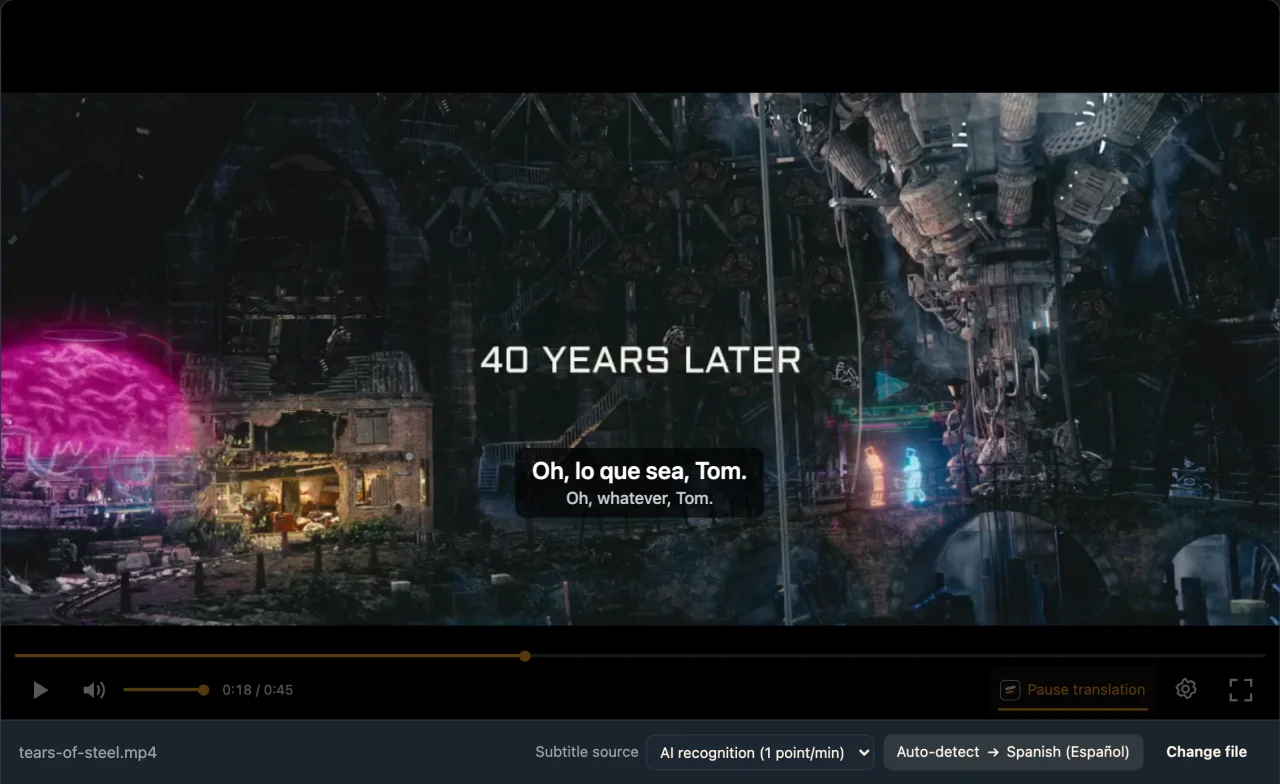
An open-movie clip with English dialogue, played in the live web local player in Chrome on a computer, signed in to WatchTranslate.
- Works
Clip with no subtitles · first line after about 6 s
AI recognition with Spanish as the target; the first translated line showed roughly 6 s after Start translation.
- Works
MKV with an English text track · about 2.3 s
The embedded track was listed on its own and translated without listening to the audio.
Tested 11 Nov 2026 · web local player · Chrome · live service
No Ollama, no model to pick: drop the film into the player and start.
NanumPlayer alternatives: common questions
What is a NanumPlayer alternative that needs no Ollama?
WatchTranslate. Open the film in its local player in a desktop browser, choose a language and press Start translation; recognition and translation both run on its side, and there are Windows, Mac, Android and iPhone apps.
Is NanumPlayer free?
Yes. Its site describes it as free and open source under GPL-2.0-or-later. A translation model in Ollama's cloud is a separate service you sign in to.
Does NanumPlayer work on a Mac?
Its site lists Windows 10 and 11 (64-bit) with an AVX2 CPU only. On a Mac, open the WatchTranslate local player in a browser or install the Mac app.
Does NanumPlayer need Ollama?
To translate speech, yes: its quick start begins by installing Ollama with a local or cloud model. A text subtitle track can be translated without a speech model or CUDA.
Does NanumPlayer need an NVIDIA GPU?
No. CPU speech recognition is included; an NVIDIA GPU with compute capability 8.6 or newer is optional for CUDA recognition.
Is there NanumPlayer for Android or iPhone?
Its pages list Windows only. On a phone, use the WatchTranslate app for Android or iPhone; on Android the local player also opens in the phone browser.
Is my video uploaded with WatchTranslate?
No. Only short audio pieces are sent, or just the subtitle text when you translate a track already in the file.
Can I keep the translated subtitles?
Yes. Export SRT or VTT in the original, the translation or both, or translate the whole film first with Start whole-video translation.
What does WatchTranslate cost?
The first 20 minutes are free with no card. After that, subtitles from the audio use 1 credit a minute and translating an existing track 0.2 credit a minute.
Keep reading
More: All guides · Local player
Also in: 简体中文 · Español · Deutsch · Français · Português · Italiano · Türkçe
Sources (with the date each was checked)
- watchtranslate.com/guides/watch-local-video-without-subtitles ·
- watchtranslate.com/app/download ·
- watchtranslate.com/guides/phone-local-video-subtitles ·
- watchtranslate.com/guides/export-video-with-subtitles ·
- kimmingul.github.io/NanumPlayer/ ·
- github.com/kimmingul/NanumPlayer ·
- github.com/kimmingul/NanumPlayer/blob/main/docs/user-guide.md ·
- llplayer.com/ ·
- github.com/umlx5h/LLPlayer ·
- github.com/umlx5h/LLPlayer/wiki/Translation-Engine ·
- potplayer.tv/?lang=en ·
- t1.kakaocdn.net/potplayer/PotPlayer/v4/Update2/UpdateEng.html ·