
Does X auto-translate videos too?
X now translates the text of foreign posts automatically, but the speech in a video stays in its original language. To follow that speech in English, add WatchTranslate on a computer and switch it on from the X player: subtitles appear as the clip plays.
Watch on your phone
Scan to get the app



What to do when the post is translated but the clip is not
Install WatchTranslate on a computer
Add it to Chrome or Edge and sign in; new accounts get 20 free minutes.
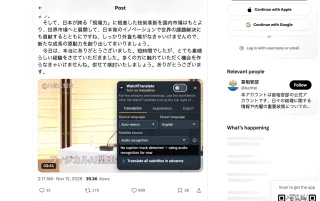
Open the panel on the video
Click the button at the top right of the X player. Target language: English. Subtitle source is filled in for you.
 WTAnd physical AI is not
Switch it on and play
Lines appear under the picture with the original sentence below, while X keeps translating the text around the video.
X does the text, WatchTranslate the voice
Both translations on one post
Keep X's auto-translate on for the post and replies. WatchTranslate only adds subtitles to the video player.
Works from the audio
No captions on the clip? It listens to the speech and writes it down before translating.
In time with the picture
Each line shows while it is being said, instead of a summary in a reply you read afterwards.
Posts that reach you in translation, videos that don't
Japanese timelines
Artists, game studios and news accounts whose posts now read in English.
K-pop fandom
Idol updates translated, the live clip attached still in Korean.
Brazilian football and politics
Fast Portuguese in clips shared alongside translated threads.
Arabic news
Broadcasters from the Gulf and Egypt posting video reports.
European newsrooms
French, Spanish and German correspondents reporting on camera.
Turkish and Indonesian creators
Commentary and vlogs that travel far once the text is translated.
What X translates, and what it leaves as is
X's translation is about written words. Video is handled differently, which is why a fully translated post can still have a clip you cannot follow.
| Part of the post | X's own translation | With WatchTranslate added |
|---|---|---|
| Post text and replies | Translated into your language, by default since April 2026 | Left to X |
| Captions that came with the video | Shown in the language they were made in | Translated into English, original line below |
| Speech in a clip without captions | Plays as recorded | Recognised and subtitled in English while it plays |
| A long interview video | Same as above | Can be prepared in full before watching |
Checked on x.com in a desktop browser on November 12, 2026. X changes its features often; see its Help Center for the current state.
What we checked on X
In Chrome on a computer, signed out of X, with the current extension: we opened a Japanese post with a video and switched WatchTranslate on from the player.
- Works
Prime Minister's Office of Japan · Japanese text, Japanese video
With audio recognition as the subtitle source, English appeared on the player with the Japanese line below, while the post text stayed as posted.
Tested November 12, 2026 · extension 0.5.793 · Chrome · signed out of X
Watch on your phone
Scan to get the app
Keep X's translation for the text and add English subtitles for the voice.
In detail
Pick the right translation for the job
| You want to… | Use | Note |
|---|---|---|
| Read a foreign post or reply | X's own translation | On by default; can be switched off per language |
| Follow what someone says in a clip | WatchTranslate on the player | Audio recognition when there are no captions |
| Quote a clip accurately | WatchTranslate, then the Export tab | SRT or VTT with the original and English lines |
| Stop seeing posts in translation | The gear icon on a translated post | X lets you switch it off per language |
Why X translates posts but not what people say
On April 7, 2026 X announced that automatic translation of posts, powered by its Grok model, was rolling out worldwide and on by default, as TechCrunch reported the next day. Since then, posts written in Japanese, Portuguese or Korean reach English timelines already translated, and the gear icon on a translated post lets you switch translation off for a language. All of that is text: the post, its replies and profiles. A video attached to the post plays with its own soundtrack, so the clip under a translated post can still be in a language you don't speak.
Where captions on X videos come from
Captions arrive with the video. X Help describes how the person posting can attach a .srt caption file, and some videos show captions generated in the language that is spoken. Either way, the language is the one the clip came with; the viewer does not get a menu of translations to choose from.
Asking Grok in the replies
Some people reply to a clip and ask Grok to translate it. That answer is a text reply you read after watching, not subtitles that follow the speaker. It can work for a quick idea of what was said, less well for a long clip or for checking an exact quote.
Subtitles on the player instead
WatchTranslate adds the missing piece on the computer: it reads the captions if there are any, otherwise it listens to the speech, and shows English lines on X's own player as the clip plays, with the original sentence underneath. The post, its translation and the replies stay exactly where they were.
How the video gets its English
Does it translate the whole video first?
No. It works in stretches of about 30 seconds, starting with the one you are watching and the next one, so a short clip is covered almost as soon as it plays.
Is this the same kind of AI translation X uses?
Both use large language models, but on different material: X translates written posts, WatchTranslate first recognises speech in the video, then translates each sentence with the lines around it in view.
What if the clip already has captions?
Then those captions are translated instead of the audio, keeping the creator's timing. It is also cheaper: 0.2 credits a minute instead of 1.
What X Help says about video
From the X Help Center, checked signed out on .
The person posting a video can attach a .srt caption file to it.
help.x.com/en/using-x/upload-caption-srt-fileX Help explains how videos are shared and watched on X.
help.x.com/en/using-x/x-videos
Making the two work together
Leave auto-translate on
It does not get in the way: X handles the text and the subtitles sit on the player.
Open the post before playing
The subtitle button follows the video playing on the post's own page.
Watch the original line
For names and numbers, glance at the sentence under the English before you repost.
X auto-translate and video
Does X auto-translate videos?
It auto-translates the text of posts. The speech in a video is not translated; the clip plays as recorded, with captions only if they came with it.
Can Grok translate a video on X?
You can ask Grok in the replies to explain or translate a clip, and it answers in text. If you want English subtitles in time with the speaker, use a tool that works on the player, such as WatchTranslate.
When did X start translating posts automatically?
Automatic translation of posts was announced worldwide on April 7, 2026, and it is on by default.
How do I turn off auto-translate on X?
Tap the gear icon on a translated post and switch translation off for that language. That only affects the text; it does not change video subtitles from WatchTranslate.
Why is the post in English but the video isn't?
Because X translates the written text. The video's audio and any captions it came with stay in their original language.
Does WatchTranslate replace X's translation?
No. It only adds subtitles to the video player. X's translation of the text keeps working as before.
Do I need an X account to use WatchTranslate on videos?
Not for public posts; we tested signed out. Posts X only shows after signing in need an X sign-in first. WatchTranslate uses its own free account.
Which videos can it subtitle?
Video posts on x.com in Chrome or Edge on a computer. For live streams the extension has a separate Live translation (beta).
How much does it cost?
New accounts get 20 free minutes, no card. After that, translating captions is 0.2 credits a minute and audio recognition 1 credit a minute.
One tool to understand foreign-language videos on many sites
Translates as you watch, wherever you are in the video
Jump anywhere and it translates there — no need to translate the whole video first.
Translate videos on YouTube, X, Bilibili and more
Translate existing subtitles directly, or generate bilingual subtitles when there are none.
Better translation quality than traditional machine or real-time translation
AI language models use context and connect the surrounding dialogue to understand meaning.
Export subtitles as SRT / VTT files
Download generated subtitles as original, translated, or bilingual text and load them in common players.
Already translated by someone? Watch it free
Sign up free to reuse generated subtitles for the same video, subtitle source and languages, even after your credits run out.
Bilingual subtitles on your phone
Play video files on your phone, or open a video site in the app's built-in browser and tap Translate. A native player handles more video formats than the web player.
Keep reading
Related questions
- How to translate a Twitter (X) video into EnglishStep by step
- YouTube auto-translate has no English optionThe same gap on YouTube
- Translate a video while it playsAny site
Sites
- Twitter (X) video translatorEnglish subtitles on posts
- TikTok video translator
More: All guides · Supported sites
Also in: 简体中文 · 繁體中文 · 日本語 · 한국어 · Español · Deutsch · Français · Português · Italiano · العربية · Polski · Nederlands · Türkçe