
Twitter video translator now for the video too
Auto-translate turned the text of foreign posts into English, so more of them reach your timeline. The clip underneath still speaks Japanese, French or Korean. WatchTranslate writes it in English on the X player, sentence by sentence.
Watch on your phone
Scan to get the app



The text gets translated. The video doesn't.
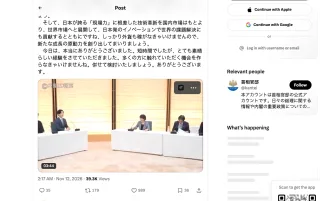
X translates what is written in a post. The video plays with its own soundtrack and with whatever captions the person who posted it added, in the language they chose. An official clip from Tokyo or Seoul often comes with neither.
- Japanese remarks at full speed
- Show translation covers the post text, not the clip
- No subtitles on the picture

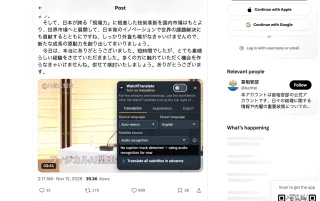
- Every sentence she says, in English
- The Japanese line stays underneath for names and terms
- Still the original post: replies and reposts right there
English subtitles on an X video in three steps
Install the extension
Add WatchTranslate to Chrome or Edge on your computer and sign in to it. New accounts start with 20 free minutes.
Open the post on x.com
Click into the post so the video plays on its own page. We were signed out of X and the public post played normally.
 WTAnd physical AI is not
Click the button on the video
It sits at the top right of the X player. Set Target language to English and turn it on; with no caption track, the panel switches to audio recognition.
Built for the clips that land in your feed
Subtitles while it plays
No upload, no waiting for a whole file. English appears as the clip runs, and if you skip ahead it picks up from there.
Clips that only have audio
Many news and press clips on X carry no captions. Audio recognition hears the speech, writes it down and translates it.
English on top, original below
Check a name, a number or a quote against what was actually said. Prefer English only? Switch the original off in Appearance.
Uses the creator's captions
When the person who posted attached a caption file, pick it under Subtitle source and it is translated with its own timing.
Keep the transcript
The Export tab saves SRT or VTT, original, English or both, so you can quote the clip accurately in a thread or a report.
Long interviews, prepared ahead
For a 40-minute interview posted as a video, use "Translate all subtitles in advance" and keep watching while the rest is prepared.
Foreign videos English speakers meet on X
Foreign news, first-hand
Reporters and broadcasters from France, Japan, Brazil or the Gulf, before any English write-up exists.
Speeches and press conferences
A minister or a CEO, clipped into a minute and shared thousands of times.
K-pop and J-pop moments
Fan-cam talk, live-stream clips and behind-the-scenes chatter from idols.
Post-match interviews
Football, F1 and baseball players speaking their own language after the game.
Product demos and launches
Tech and games teams presenting in Japanese, Korean or Chinese first.
Podcast and interview cuts
The two viral minutes of a long talk, reposted on their own.
Is X's own translation enough?
Often it is: if you only need the words of the post, or the creator added English captions, X has you covered. WatchTranslate is for the moments when you want to understand what is said in the video.
| What's in the post | What X offers | With WatchTranslate |
|---|---|---|
| Post text in another language | Translated for you, automatically or with Show translation | Leaves the text to X and subtitles the video |
| Video with captions the creator added | You can turn them on; the language is the poster's choice | Translates that caption track into English, original below |
| A news clip with audio only | Often no captions to choose from | Recognises the speech and shows English as it plays |
| A half-hour interview | Same as above, post by post | Can prepare the whole subtitle track first |
The X column reflects a post page on x.com in a desktop browser, signed out, checked on November 9, 2026. See X's current pages for changes.
What we tried on X
On a computer with the current extension, signed out of X: we opened a public post with a video and clicked the WatchTranslate button on the player.
- Works
Japanese remarks from the Prime Minister's Office · English on the player
A round-table video, translated with audio recognition: English appeared on the player with the Japanese underneath.
- Works
The button lives on the video itself
WatchTranslate sits at the top right of the post's player and the panel opens there, so you never leave the post or its replies.
Tested November 12, 2026 · extension 0.5.793 · Chrome · signed out of X
Watch on your phone
Scan to get the app
Spend your 20 free minutes on the next foreign clip that shows up in your feed.
In detail
What to do with each kind of clip
| What you want | What to do | Worth knowing |
|---|---|---|
| Get the gist of a short news clip | Turn the switch on and play | With no caption track the panel uses audio recognition by itself |
| Quote someone accurately | Keep the bilingual view, then save from the Export tab | SRT or VTT, with the original line next to the English |
| A long interview or a podcast clip | Click "Translate all subtitles in advance" | The video keeps playing while the rest is prepared |
What happens when you turn it on
Where does the English come from on a clip without captions?
WatchTranslate works through the playing video in stretches of about 30 seconds: it recognises the speech in the stretch you are watching and the next one, then translates each sentence with the ones around it in view. Jump ahead and it starts from where you landed.
Why do names and numbers come out right more often?
Translation is done by a large language model that sees the neighbouring sentences, so a pronoun or an acronym is resolved in context. The original line sits just underneath when you want to check.
Why do viral clips sometimes show English instantly?
Finished subtitles are kept per video, source and target language. If someone already translated the same X video into English, those lines are reused and appear straight away.
What X says
From the X Help Center, checked signed out on .
X Help explains how to share and watch videos on X.
help.x.com/en/using-x/x-videosX Help explains how the person posting a video can attach a .srt caption file to it.
help.x.com/en/using-x/upload-caption-srt-file
Three habits that help
Start from the post page
Click into the post before playing. The button follows the video that is actually playing there.
Name the language for mixed clips
If a speaker switches between languages, set Source language yourself instead of Auto-detect.
Export before you quote
Save an SRT from the Export tab before you write about what someone said.
Twitter video translator questions
How do I translate an X (Twitter) video into English?
Install WatchTranslate in Chrome or Edge, open the post on x.com and click the WatchTranslate button at the top right of the video. Set Target language to English and turn it on. English lines appear as the clip plays.
Doesn't X translate videos on its own now?
X translates the written text of posts. A video plays with its original audio, plus any captions the person who posted it attached. If those captions are not in a language you read, WatchTranslate translates them or works from the audio.
Can I translate the audio of a Twitter video that has no subtitles?
Yes. Choose Audio recognition under Subtitle source, or let the panel pick it when it finds no caption track. It recognises the speech in the clip and translates it.
Is there a Chrome extension that translates X videos?
WatchTranslate is a Chrome and Edge extension for computers. After installing it, its button appears on X's video player.
Do I have to download the video or paste a link somewhere?
No. Everything happens on the original post. Nothing is downloaded to your computer, and the replies stay right under the video.
Which languages can it translate from?
Leave Source language on Auto-detect and it works out the spoken language itself; in our tests it recognised Japanese and French. If a clip mixes languages, pick the main one yourself.
Do I need an X account?
We tested signed out of X and the public post played and translated normally. Some posts are only shown to signed-in users; in that case sign in to X first. WatchTranslate itself needs its own free account.
How much does it cost?
New accounts get 20 free minutes, no card needed. That is enough for several short clips.
Does it work on X live streams?
This page is about video posts. For live audio and live streams, the extension has a separate Live translation (beta) that you can apply for at watchtranslate.com/live.
Keep reading
Related guides
- How to translate an X (Twitter) video, step by stepSource, language and export
- Does X auto-translate videos?Posts yes, speech no
- Translate an X video saved on your deviceWith the local player
By language
- Korean video to English subtitlesIdols, variety, news
- English subtitles for Japanese videosAnime, vlogs, news
More: Supported sites · All guides
Also in: 简体中文 · 繁體中文 · 日本語 · 한국어 · Español · Deutsch · Français · Português · Italiano · العربية · Polski · Nederlands · Türkçe · ไทย · Bahasa Indonesia · Tiếng Việt · Русский · हिन्दी
X is a trademark of X Corp. WatchTranslate is not affiliated with or endorsed by X or X Corp.