
How do I translate a saved Twitter video from X?
When the clip is already on your computer or phone, there is no need to upload it to an online editor and wait for a new copy. Open the file in the WatchTranslate local player, pick your language and press Start translation: subtitles are made from the speech and appear while it plays.

From a saved clip to English subtitles
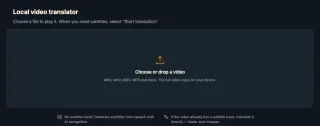
Drop the video file in
Open the local player in a desktop browser, sign in, and choose the MP4 or MOV from your folder.
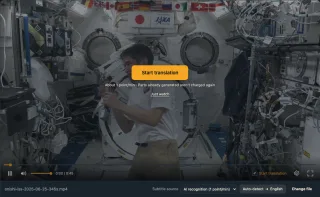
Check the source and language
With no text track in the file, Subtitle source shows AI recognition. Set the target language to English.

Press Start and watch
Lines appear as the clip plays, English on top and the original underneath.
What the local player does with a clip from X
Subtitles from the speech
A file with no subtitle track inside still gets subtitles: AI recognition writes the speech down, then translates it.
Both languages on screen
Keep the original line under the translation, or show the translation only.
Subtitles you can keep
Export what has been generated as SRT or VTT: original, translation or both.
Clips from X people keep on their devices
News clips
A foreign broadcast someone posted.
Interviews
A player, artist or expert answering questions.
Talks
A keynote or lecture excerpt.
Clips sent to you
A video a friend shared in a chat.
Your own posts
The file you uploaded to X yourself.
Clips on your phone
Open them in the app on the phone.
Why not upload it to an online video editor?
Online translators ask you to upload the file or paste a link, wait while it is processed, then download a new video or subtitle file. For a clip you just want to understand, the local player plays it straight away and writes subtitles as it goes.
| You want | Typical upload tool | WatchTranslate local player |
|---|---|---|
| Start watching | After the upload and processing | The file plays as soon as you open it |
| Keep the video private | The file is sent to the tool | Only the audio pieces it needs are sent |
| Read two languages | Depends on the tool | Choose Bilingual |
| Keep the subtitles | Download a file | Export SRT or VTT |
Formats the browser can't play, such as AVI or HEVC, open in the Windows or Mac app.
What we tried
On a computer with the live web local player in Chrome, signed in to WatchTranslate.
- Works
Japanese speech, no subtitle track
A public-domain NASA clip, saved as a local file (not taken from X): JAXA astronaut Takuya Onishi answering students in Japanese, after an interpreter's English. Subtitle source was AI recognition; we picked English, and English lines appeared over the video with the Japanese underneath.
Tested 13 Nov 2026 · web local player · Chrome · live service
Drop the clip into the local player, choose English, and start.
In detail
Where you have the video decides the route
| You have | Use | Worth knowing |
|---|---|---|
| The post is still on X | The browser extension, on the post | Creator captions are translated at 0.2 credits a minute |
| An MP4 or MOV on your computer | Local player, AI recognition | 1 credit a minute, language auto-detected |
| The clip plus an SRT or VTT file | Load subtitle file… | Billed like subtitle translation |
| The clip on an Android phone or iPhone | The WatchTranslate app | Or the local player in the phone's browser |
A file has lost what the post had
On X, a video can come with captions the creator attached, and the post around it says who is speaking and why. A saved MP4 often keeps only the picture and the sound. In that case the local player offers AI recognition: it listens to the speech, writes it down and translates it, about 30 seconds at a time, following the playhead. If the post is still online, translating it on X instead can use the creator's captions.
Where your file goes
The full video stays on your device. AI recognition sends only the audio pieces it needs; a loaded subtitle file sends only its text. Recognition and translation run on our service, so keep the browser online while it plays.
WatchTranslate doesn't fetch videos from X
The local player works on files you already have, and the extension works on posts you are watching. Neither saves videos from X, so use them with clips you are allowed to keep and watch, such as your own posts or videos shared with you.
If nothing appears
Quiet stretches and music correctly produce no text. A file that won't play usually uses a codec the browser lacks: try the desktop app. On an error, check sign-in and credits, then retry the missing piece.
What happens when you open the clip
Does it need the post link?
No. The local player works on the file alone, whatever site it came from.
Does it start on its own?
No. Choosing a file only prepares playback and costs nothing; processing begins when you press Start translation.
Can I skip ahead?
Yes. Work follows the playhead, so subtitles are made next for the part you jump to.
Cleaner subtitles for X clips
Name the language if you know it
Picking the spoken language helps on clips with music or crowd noise.
Use the post while it is up
Creator captions on X beat recognition and cost less.
Keep the original line
Names and numbers are easier to check in two languages.
About translating saved X videos
Do I have to upload the whole video?
No. The file plays from your device; only the audio pieces needed for recognition are sent.
Does WatchTranslate download videos from X?
No. It translates posts while you watch them on X with the extension, and files you already have in the local player.
Do I need an X account or the post link?
No. The local player only needs the file and a WatchTranslate account; X isn't involved at all.
Can I translate a clip that's on my phone?
Yes. Install the WatchTranslate app on Android or iPhone and open the video there, or use the local player in the phone's browser.
Can I get an SRT file of the translation?
Yes. Export saves what has been generated so far as SRT or VTT, with the original, the translation or both.
Can I set the spoken language myself?
Yes. Leave it on Auto-detect or pick the language of the speech; for a clip that mixes two languages, choose the main one.
Which video formats work?
MP4, MOV, WebM, MKV and others the browser can play; the desktop app opens the rest.
What does it cost?
New accounts get 20 free minutes, no card. After that, AI recognition is 1 credit a minute and translating an existing subtitle track 0.2 credits a minute.
One tool to understand foreign-language videos on many sites
Translates as you watch, wherever you are in the video
Jump anywhere and it translates there — no need to translate the whole video first.
Translate videos on YouTube, X, Bilibili and more
Translate existing subtitles directly, or generate bilingual subtitles when there are none.
Better translation quality than traditional machine or real-time translation
AI language models use context and connect the surrounding dialogue to understand meaning.
Export subtitles as SRT / VTT files
Download generated subtitles as original, translated, or bilingual text and load them in common players.
Already translated by someone? Watch it free
Sign up free to reuse generated subtitles for the same video, subtitle source and languages, even after your credits run out.
Bilingual subtitles on your phone
Play video files on your phone, or open a video site in the app's built-in browser and tap Translate. A native player handles more video formats than the web player.
Keep reading
On X
- Translate videos on XThe extension on post pages
- Translate a Twitter video into English
- Does X auto-translate videos?
More: All guides · Local player
Also in: 简体中文 · 繁體中文 · 한국어 · Español · Deutsch · Français · Português · Italiano · العربية · Polski · Nederlands · Türkçe