
How do I get YouTube dual subtitles, two languages at once?
YouTube's own player shows one caption track at a time, so you can't stack two languages there. Add WatchTranslate and click WT on the player: your language appears on top and the original line right below, both in sync.
Watch on your phone
Scan to get the app


Three steps to dual subtitles on YouTube
Add the extension or app
On a computer, add the extension to Chrome or Edge in half a minute. On a phone, install the WatchTranslate app.
Open the video on YouTube
Play the video as usual, with or without captions. No YouTube sign-in needed.
WTA parallel digital worldClick WT and start
Click WT on the player, then Start translating. Your language shows on top with the original line below.
What two lines on YouTube are good for
Learn from videos you already watch
The meaning sits on top and the phrasing you hear sits below, line by line, so a vlog or a talk doubles as reading practice.
Check a line without pausing
When a translation reads oddly, glance down at the original instead of rewinding.
Works when the video has no captions
No caption track to pair with? WatchTranslate writes the original line from the audio first, then adds the translation above it.
What people watch with two lines on YouTube
Foreign vlogs and street interviews
Street interviews and vlogs from Japan, Korea or Latin America: fast, casual speech that is easiest to follow with the original line alongside.
Lectures and open courses
University lectures and TED talks, with terms shown next to the original so no sentence slips past.
News and interview shows
Foreign news and long-form interviews, understood the day they go up.
Anime and series on official free channels
Episodes streamed free on official channels, even when they have no English subtitles.
Gaming streams and replays
Foreign-language streamers and hours-long replays; skip to the good part and read along.
Reviews and tutorials
Product reviews and step-by-step tutorials from abroad, every setting and every step clear.
Can't YouTube show two subtitles by itself?
YouTube's player picks one caption track, original or auto-translated. When one line is all you need, its own captions are fine.
| What you want | In YouTube's player | With WatchTranslate |
|---|---|---|
| One language only | Pick a caption track or Auto-translate | YouTube's own captions are enough |
| Translation and original together | One track at a time; switch back and forth | Both lines on screen, in sync |
| Original on top instead | Not available | Choose Bilingual · original on top |
| Video with no captions | CC greyed out, nothing to show | Original written from the audio, then translated |
What the table shows is YouTube on a computer browser, signed out.
What we tried on YouTube
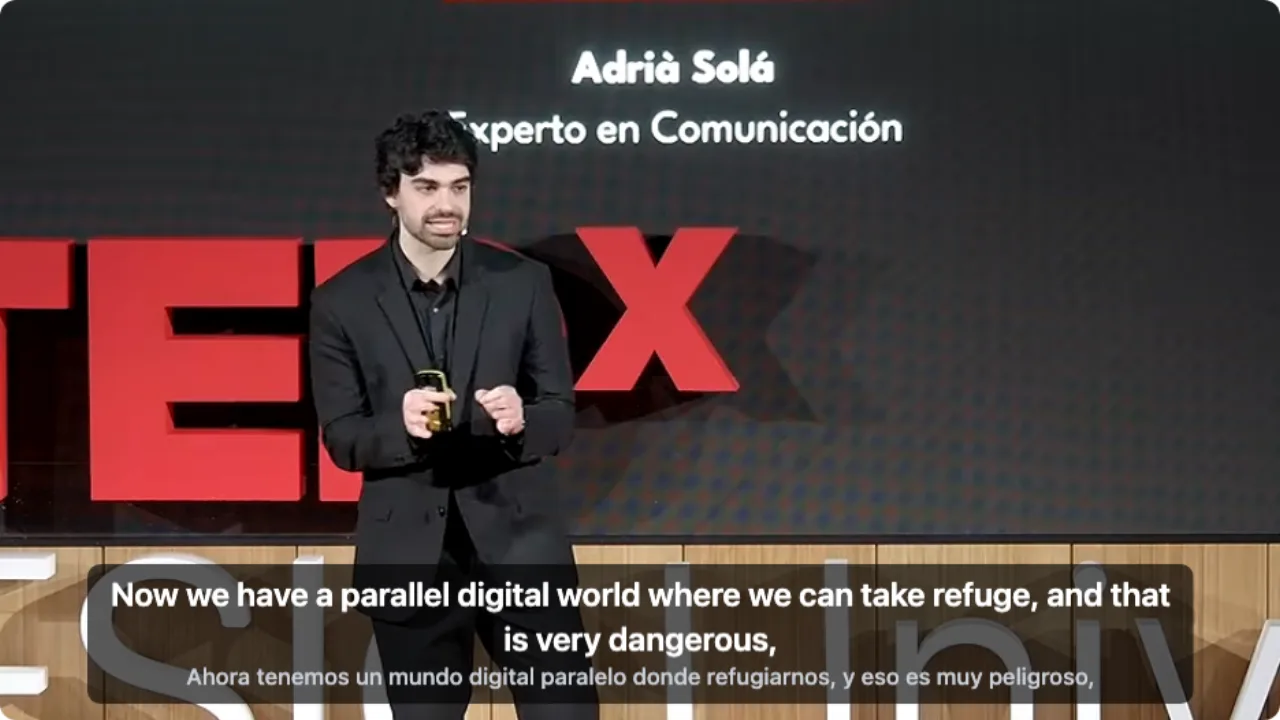
On a computer with the latest extension, signed out of YouTube, opening a Spanish talk, clicking WT on the player and choosing audio recognition.
- Works
Spanish TEDx talk · English on top, Spanish below
Audio recognition wrote down the Spanish speech; both lines sat on YouTube's player together.
Tested 9 Nov 2026 · extension 0.5.737 · Chrome · signed out of YouTube
Watch on your phone
Scan to get the app
Then open any YouTube video: click WT on a computer, or tap Translate in the app.
In detail
Which layout fits what you're doing
| You want to | Choose | Why |
|---|---|---|
| Follow the story | Bilingual · translation on top | Your eyes land on the line you read fastest; the original is there when you need it |
| Practise the video's language | Bilingual · original on top | Read the phrasing first, then check the meaning below |
| Keep the picture clear | Target only | One line, and you can switch back to two any time without starting over |
Why YouTube shows only one line
YouTube's captions menu switches between tracks: the creator's captions, YouTube's automatic captions, or Auto-translate into another language. Whichever you pick replaces the one before, so the player never shows the original and a translation together. Dual subtitles need a second layer on top of the player, and that is what WatchTranslate draws: each translated line comes from one original line on the same timeline, so the two always appear and disappear together.
Pick which line goes on top
In the panel's Appearance tab, choose Bilingual · translation on top, Bilingual · original on top, or Target only. The original line is a little smaller by default; make the text smaller or move the block up if two lines cover too much of the picture.
When the video has captions
Set Subtitle source to the video's own captions. WatchTranslate translates that track and keeps its timing, so the original line under the translation is exactly what the creator uploaded. If YouTube's automatic captions are messy, switch the source to audio recognition.
When it has none
Set Subtitle source to audio recognition. The speech is written down first, then translated, and both lines show together a few seconds after you press play.
On a phone
Install the WatchTranslate app, open the YouTube video inside it and tap Translate. It shows the same two lines.
How WatchTranslate does it
Where does the original line come from?
From the video's caption track when it has one; otherwise from the audio. WatchTranslate works 30 seconds at a time: it gets the original lines for that stretch, then a large language model translates them using the sentences around them. The current stretch and the next go first; after you skip, it starts from where you landed.
Does switching layouts cost anything?
No. Once a stretch is done, the original and the translation are both kept, so switching between the bilingual layouts and Target only is instant and doesn't start anything again.
Can I keep the two lines afterwards?
Yes. Export SRT or VTT from the panel's Export tab and choose bilingual to get both lines in one file.
What YouTube's player offers
From the YouTube Help Center, checked signed out of YouTube on .
YouTube's captions are switched on and styled from the CC button and the settings menu, one caption track at a time.
support.google.com/youtube/answer/100078
Make two lines easy to read
Shrink the original a little
A smaller second line keeps your eyes on the translation and the picture uncovered.
Raise the block on busy videos
If the video has burned-in text near the bottom, move the subtitles up in the Appearance tab.
Prepare long videos first
For an hour-long lecture or course, prepare the whole video in advance and skip around freely.
About dual subtitles on YouTube
Can YouTube show two subtitles at once by itself?
No. Its player shows one caption track at a time; Auto-translate replaces the original rather than adding a second line.
Which languages can I pair?
Any spoken language in the video with any of the 74 subtitle languages WatchTranslate offers.
Do dual subtitles work on videos without captions?
Yes. The original line is written from the audio first, then translated.
Can I put the original on top?
Yes. In the Appearance tab, choose Bilingual · original on top.
Does showing two lines cost more?
No. The cost is the same whichever layout you choose.
Can I download YouTube dual subtitles?
Yes. Export SRT or VTT from the Export tab and choose bilingual.
Do they work on my phone?
Yes, in the WatchTranslate app: open the YouTube video in the app and tap Translate.
Do I need to sign in to YouTube?
No. We tested signed out; any video that plays normally works.
One tool to understand foreign-language videos on many sites
Translates as you watch, wherever you are in the video
Jump anywhere and it translates there — no need to translate the whole video first.
Translate videos on YouTube, X, Bilibili and more
Translate existing subtitles directly, or generate bilingual subtitles when there are none.
Better translation quality than traditional machine or real-time translation
AI language models use context and connect the surrounding dialogue to understand meaning.
Export subtitles as SRT / VTT files
Download generated subtitles as original, translated, or bilingual text and load them in common players.
Already translated by someone? Watch it free
Sign up free to reuse generated subtitles for the same video, subtitle source and languages, even after your credits run out.
Bilingual subtitles on your phone
Play video files on your phone, or open a video site in the app's built-in browser and tap Translate. A native player handles more video formats than the web player.
Keep reading
Related questions
- What are bilingual subtitlesWhy two lines help
- YouTube auto-translate has no EnglishWhen your language is missing
- YouTube video has no subtitlesNo CC? Create them from the audio
- Original-language subtitlesFor language learners
- Google Translate and YouTube videos
More: All guides · Supported sites
Also in: 简体中文 · 繁體中文 · 日本語 · 한국어 · Español · Deutsch · Français · Português · Italiano · العربية · Polski · Nederlands · Türkçe · ไทย · Bahasa Indonesia · Tiếng Việt · Русский · हिन्दी